
How to pace a lesson when students work at different speeds
By the Workshopy teamPublished 7 min read
Don't pick one speed for the whole class. Give every stretch of practice a core task that everyone must finish, with a clear line for "done", and extra work on the same idea for whoever gets there first. Help the slower students finish the core rather than skip it, and bring the class back together at a checkpoint before the next new idea, once most of the room is through.
The spread is normal, so plan for it
In any hands-on class, the first student often finishes an exercise long before the last one is halfway. Some have done something similar before, some type faster, some hit an error on the second line. The Carpentries, who train instructors for hands-on coding workshops, tell their instructors plainly that there will always be a mix of more and less advanced people in a class, and that no class can meet everyone's individual needs. Slowing down for a few bores the rest; speeding up for a few loses the rest.
So the question isn't which speed to teach at. It's what each student does while the others catch up, and when the class meets again. A lesson that answers both has three parts per idea: a short explanation together, practice at each student's own speed, and a checkpoint. How to keep a whole class on the same step covers the together part. This guide is about the practice in between.
Write a core task everyone finishes
The core is what every student needs before the next idea. Keep it small: one task, one new thing, and a line that says when it's done. "You're done when your heading is green" is a line a student can check without asking you. "Experiment with CSS" isn't.
Two tests for a good core task:
- Can the slowest third finish it in the time you have? If not, it isn't a core task, it's two. Cut it in half.
- Does the next step need it? If the next step doesn't build on it, it belongs in the extensions.
Barak Rosenshine's review of classroom research found that the most effective teachers kept students' success rate during practice high, around 80 percent: right often enough to be learning, wrong often enough to be challenged. He also warns that unless every student masters the first lessons, the slower students fall further behind when the next ones are taught. A core task sized so that nearly everyone gets it right is how you get there.
Give early finishers more of the same idea
A student who finishes early needs something to do, or they will find something. The Carpentries' advice is to write several exercises for each teaching episode, so that more advanced learners don't finish early and get bored.
Make those extras go sideways, not forward. An extension practises the same idea in a new way: a harder case, a variation, the same skill with less help. It does not start the next topic. A student who races ahead into tomorrow's content is now on a different lesson from the rest of the room, and your next explanation either repeats what they did alone or skips what they need.
Thomas Guskey, describing mastery learning, calls these enrichment activities: work that lets students who have mastered a unit broaden and expand what they learned, rather than drill it again. In practice, end each practice step with a short list:
- Finished early? Pick one. Three small tasks, each a few minutes long.
- Say that the next step doesn't need them, so a slower student doesn't feel behind for skipping them.
- Make the last one open-ended, so nobody runs out.
Help slower students finish the core, not skip it
When a student is far behind, the temptation is to tell them to skip ahead with the class. Then they start the next step without the thing it builds on, and fall further behind. The core is the one part nobody skips.
What helps instead is targeted support, not the same explanation again. Guskey's point about corrective instruction is that it isn't reteaching: it goes at the specific thing the student got wrong, in a different way. In a hands-on class that might be a worked example of the step, a hint about the one line most people get wrong, or two minutes at their side. He also notes that this extra help usually adds about 10 to 20 percent more time to a unit, and that students who get it early need less help later.
Some practical moves:
- Put a hint after the task, folded or at the bottom, for the most common mistake.
- Pair a student who finished with one who is stuck, now and then. The Carpentries suggest asking more advanced learners to help the people next to them. Don't make the same fast student the room's assistant all day.
- Go to the slowest students first once most of the room is through, before they ask. How to tell which students are stuck covers finding them.
Set a time and a checkpoint
Self-paced practice needs an end, or the gap between the first and last student keeps growing. Before the practice starts, say how long it is: "ten minutes for this one". Then decide in advance what happens at the checkpoint.
Move on when most of the class has finished the core, not when the first student does and not when the last one does. If a few are still working, give them a minute and say what "done" looks like. If many are still working, the problem isn't speed: the task was too big or the explanation didn't land, and the fix is a short explanation to everyone, not more time.
At the checkpoint, gather the class for something short that uses the core: a question everyone answers (checking for understanding without stopping the class has ideas), a student showing their result, or the next explanation. Students who were working on an extension stop there; it was optional.
Use what you learn for next time
Your first guess at how long a step takes is usually wrong. After the class, note for each step how long most students took and how many got stuck. A step where everyone finished in three minutes needs more extensions. A step where most took twice as long as you planned needs splitting. Two or three runs of the same lesson and the timing is close.
How Workshopy shows the spread
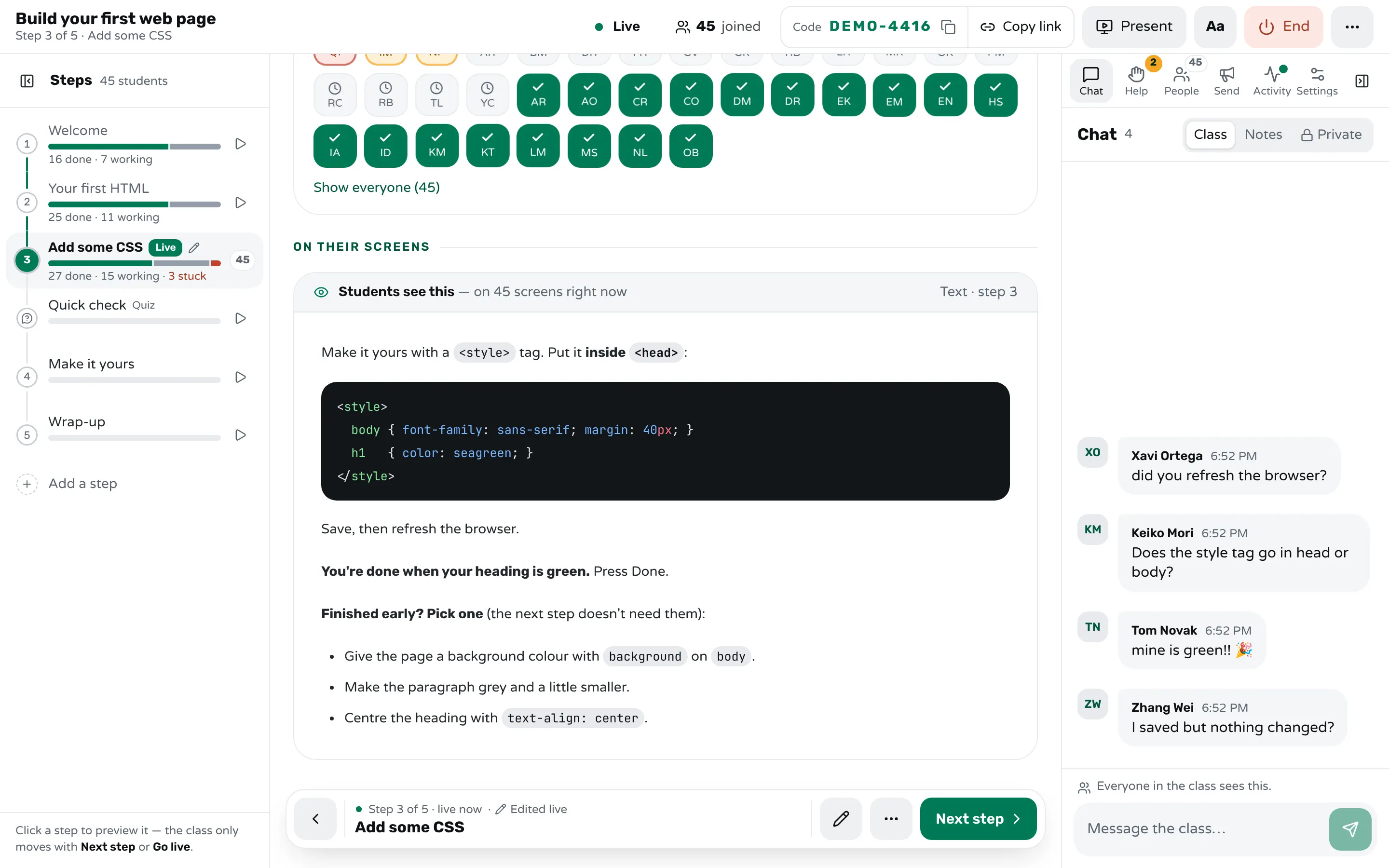
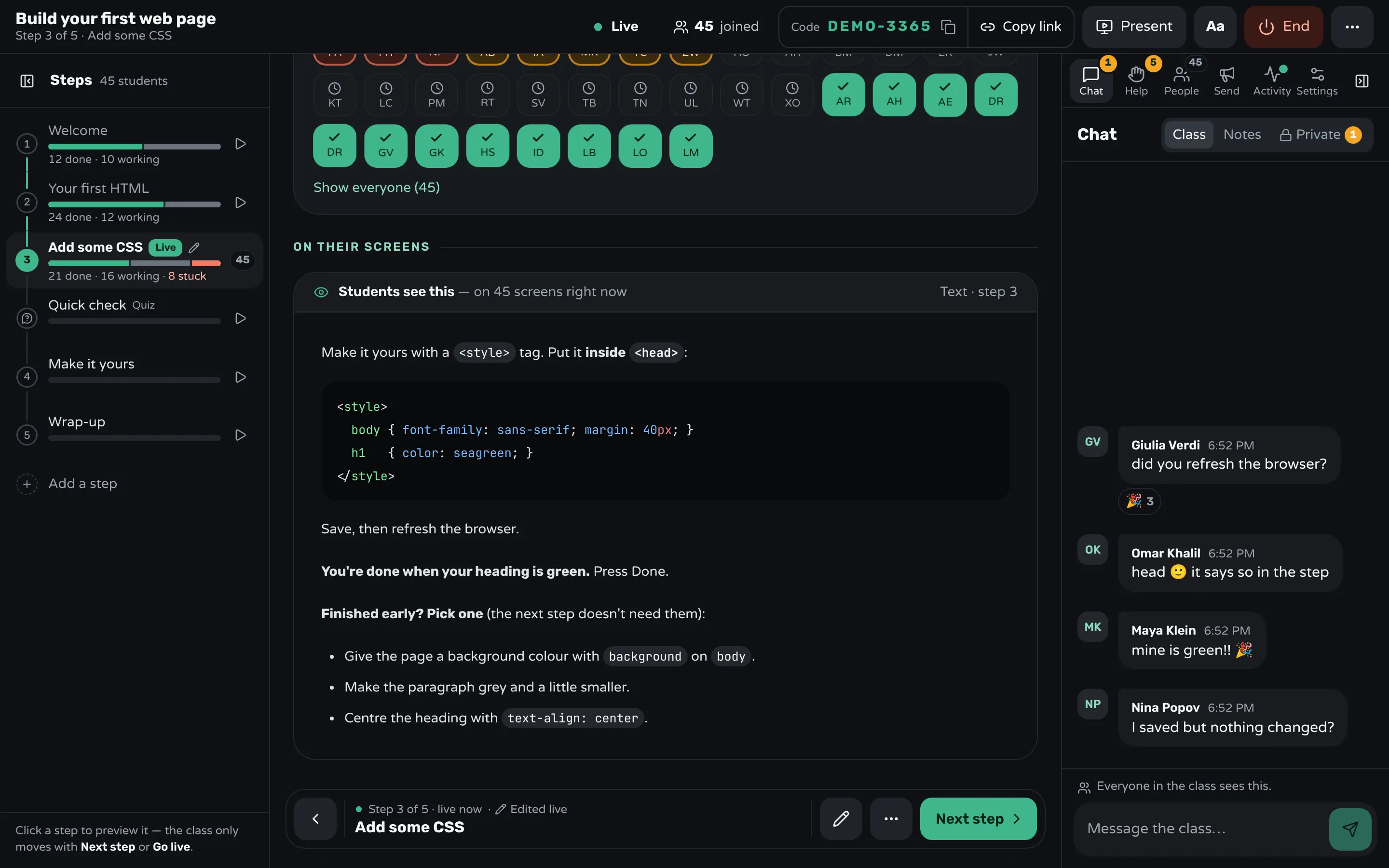
In Workshopy, a lesson is a list of steps, and each student marks Done on a step when they finish it. On your screen, the room shows every student's square as done, working or asking for help, and the step outline beside it shows the counts for each step. You can see the moment most of the class is through the core.
Write the extensions into the step itself, under the line that says when the core is done, as in the picture. With Look ahead on in the live settings, a student can also open the next steps on their own; the student's outline always shows which step you are on, with a Jump button back to it.
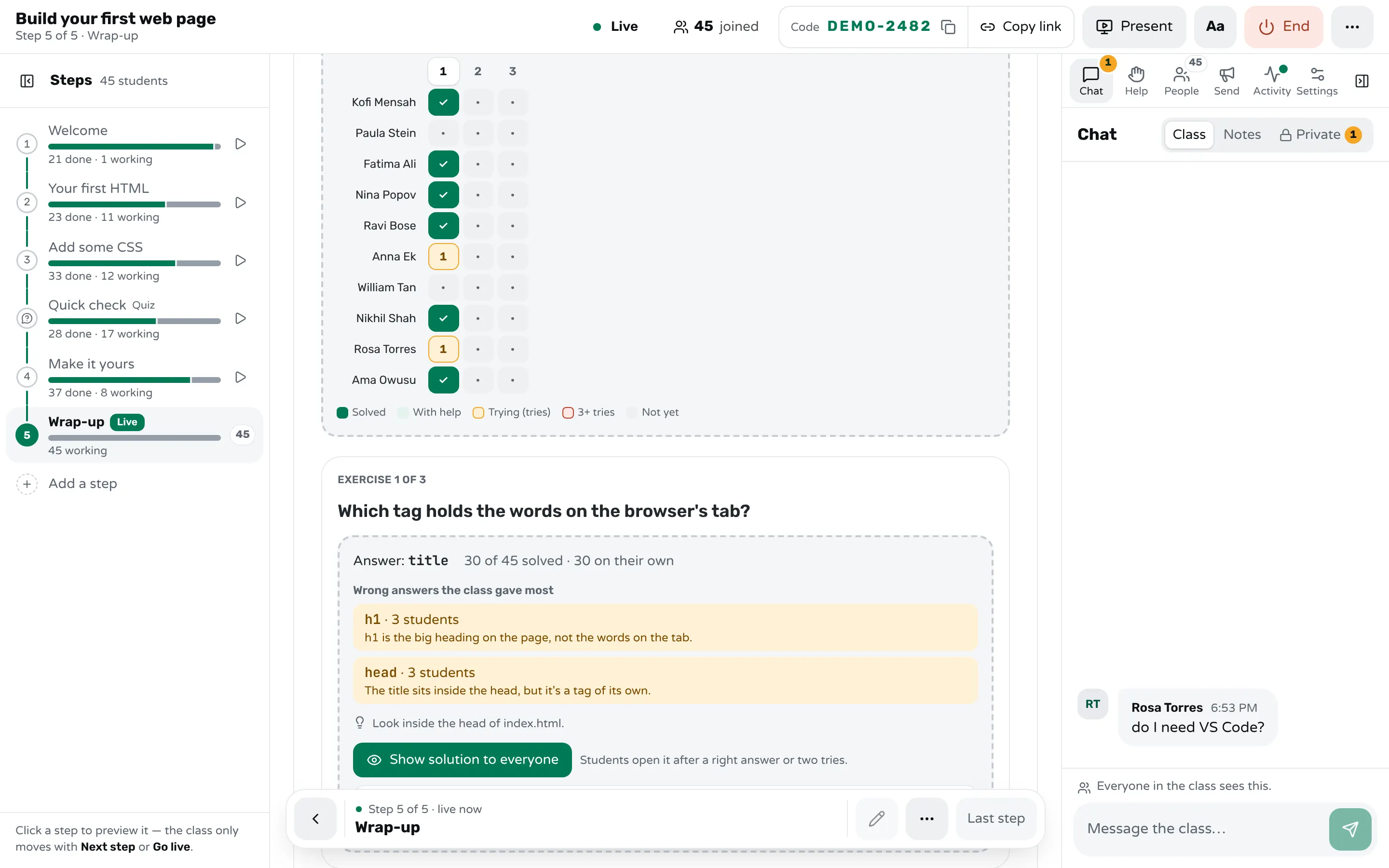
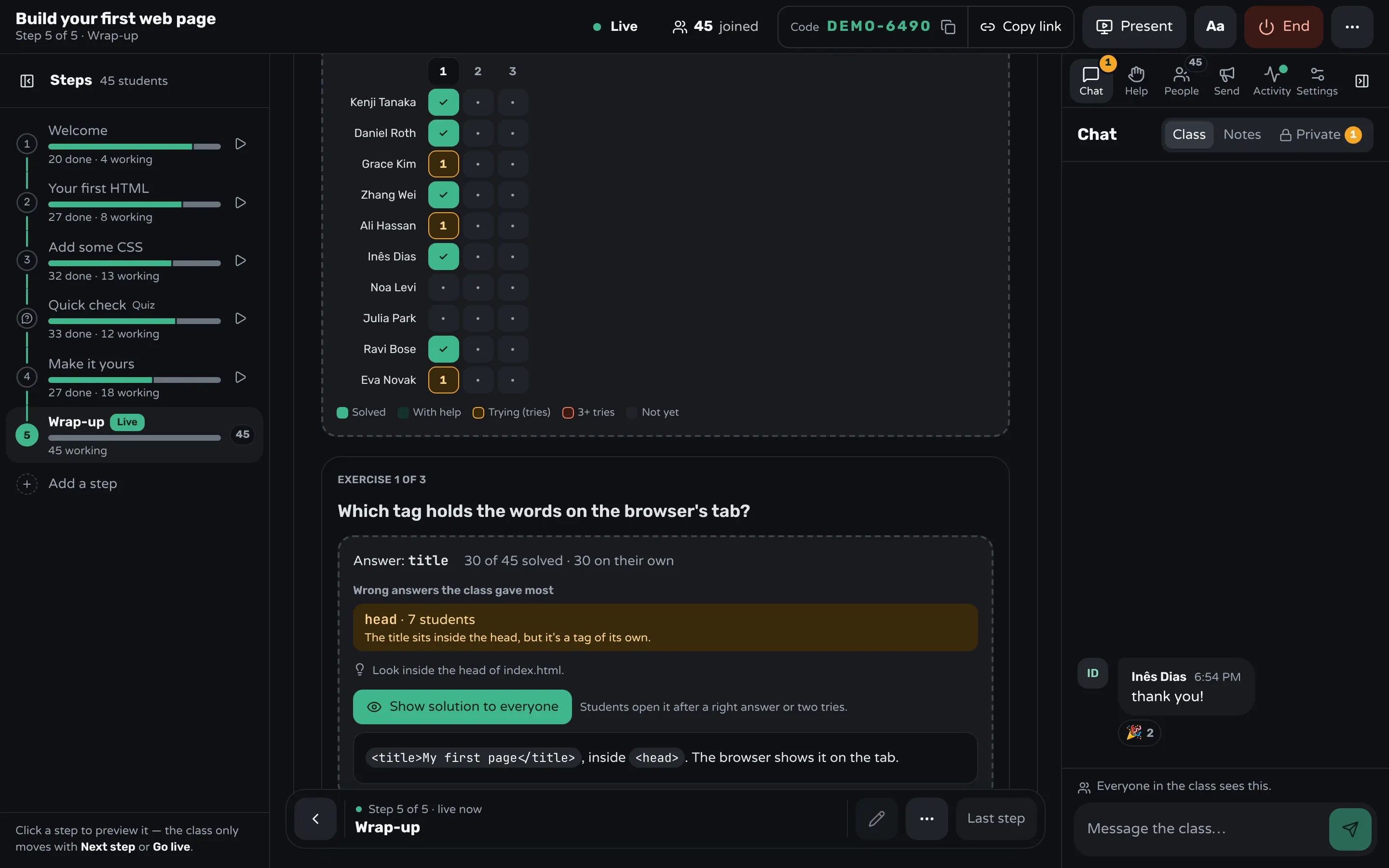
For practice that has right answers, write a practice step. Students work through its exercises one at a time at their own speed: Check an answer, ask for a Hint, and after a right answer or two tries, read the worked solution. On your screen, a grid shows every student against every exercise: right alone, right with help, trying, stuck, or not started, with the wrong answers the class gives most. Show solution to everyone opens one exercise's solution for the whole class when many are stuck on it.
For the slowest students, Spot students who take longer (on by default, in the live settings) marks a student who has been on a step much longer than most of the class without asking for help. Only you see the mark. At the checkpoint, Bring everyone moves the whole class to the step you choose in one move. After the class, the report shows for each step how long most students took, how many got stuck and how long they waited for help, which is the timing you need for next time.
Frequently asked questions
What should students do when they finish early?
Give them extra work on the same idea: a harder case, a variation, or the same task with less help. Avoid sending them into the next topic, or they end up on a different lesson from the rest of the class.
Should I slow down for the slowest students?
Don't slow the whole class; give the slowest students more help on the core task instead. Cut the extras for them, never the part the next step builds on.
When should I move the class on?
When most students have finished the core task. If many haven't, the task was too big or the explanation didn't land, so explain again briefly rather than waiting longer.
Is self-paced learning better than teaching the whole class together?
Each fits a different part of the lesson. New ideas work best explained to everyone together in small steps; practice works best at each student's own speed, with a checkpoint where the class meets again.
How long should a stretch of self-paced practice be?
Long enough for most of the class to finish the core task, which for a single small task is often five to fifteen minutes. Say the time out loud before it starts, and adjust it next time from how long students actually took.
Keep reading
How to keep a whole class on the same step
Decide step by step whether the class moves together or at its own pace, check who is behind before you move on, and regroup in one move.
2 min read · 19 Oct 2026
See who's stuckHow to tell which students are stuck in a hands-on class
Stuck students rarely raise a hand. Give every step a done signal, look for who hasn't sent it, and help the right student first.
3 min read · 19 Oct 2026
See who's stuckHow to check for understanding without stopping the class
Ask one question everyone answers at once, write it so wrong answers show the mistake, and decide in a minute what to teach next.
7 min read · 20 Oct 2026
Ready-made lessons from the library
Meet Workshopy — A Live, Interactive Product Tour
A live, interactive product tour of Workshopy for new users. It runs as a real Workshopy session, so the audience experiences the product as participants while…
16 steps · ~120 min · Free
OtherIntro to Git — Snapshots, Branches & Sharing
A short, hands-on first lesson in Git for complete beginners. Students build the mental model one idea at a time — snapshots, the three areas…
10 steps · ~65 min · Free
ScienceHow Epidemics Spread — R, Curves and Herd Immunity
An interactive first look at how infectious diseases spread through a population — and what stops them.
9 steps · ~60 min · Free
Learn any of them on your own, free, or copy one and teach it live. Browse the library
See it with a class of 45. No sign-up.
The live demo runs the real product with a simulated class. When you're ready, start free.