
How to tell which students are stuck in a hands-on class
By the Workshopy teamPublished 3 min read
Don't wait for raised hands. In a hands-on class the students who are stuck are often the last to ask, so give every step a small signal that costs nothing to send (done, or I need help) and look for who hasn't sent it. The gap between who has finished and who hasn't tells you where to go next, whether you run it with sticky notes on laptops or with a live view of the room.
Why stuck students stay quiet
Asking for help in front of a room costs something: you admit you're behind, you interrupt, and then you wait. Research on help-seeking finds that students often avoid asking even when they know they need help, especially when asking feels like admitting they can't keep up.
In a hands-on session that silence compounds. Each exercise builds on the last, so a student stuck on step two is lost on step three, and by the time they speak up they need more than a quick fix. Asking "any questions?" more often doesn't change this. Making a report cheaper than staying silent does.
Give every step a signal
Break the exercise into short steps and ask for one small action at the end of each: mark it done. A second action says "I need help". Both should take one tap or one sticky note, and neither should require speaking up.
Coding instructors have used a low-tech version for years: every learner gets two coloured sticky notes, one for "done" and one for "I need help", and puts the right one on their laptop. Greg Wilson notes that this works better than raised hands because it's discreet, so people actually do it; they can keep working while their flag is up; and the teacher can see the state of the whole room from the front.
- Keep each step to a few minutes of work, so the signal stays fresh.
- Say what "done" means: "you see your heading in the browser", not "you've read the step".
- Make asking for help private, so it isn't a public confession.
Read the room: look for who hasn't moved
Once most of the class has marked a step done, the students who haven't are your list. Some are slower and fine; some are stuck and haven't said so. Go to them first, or send them a private message.
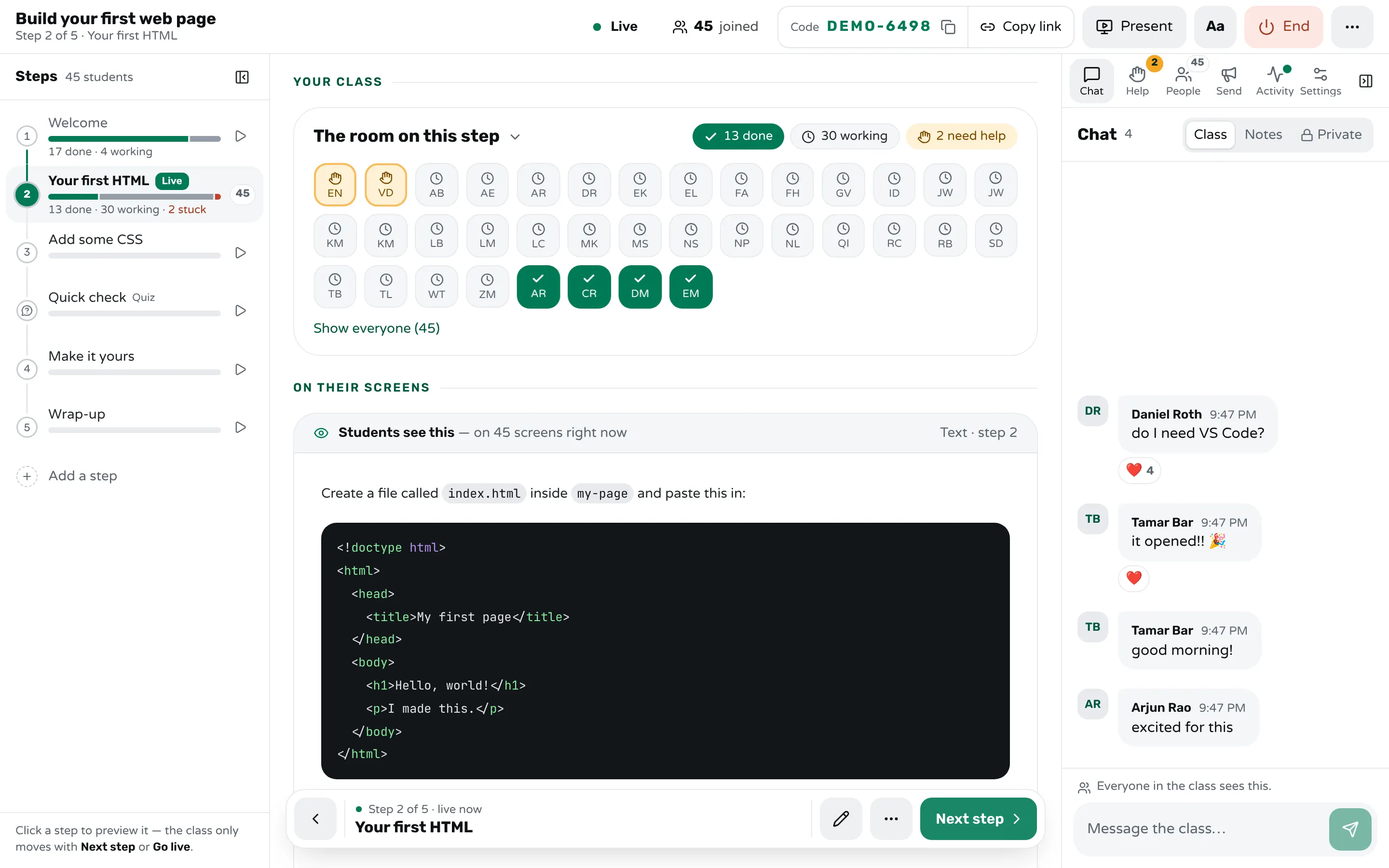
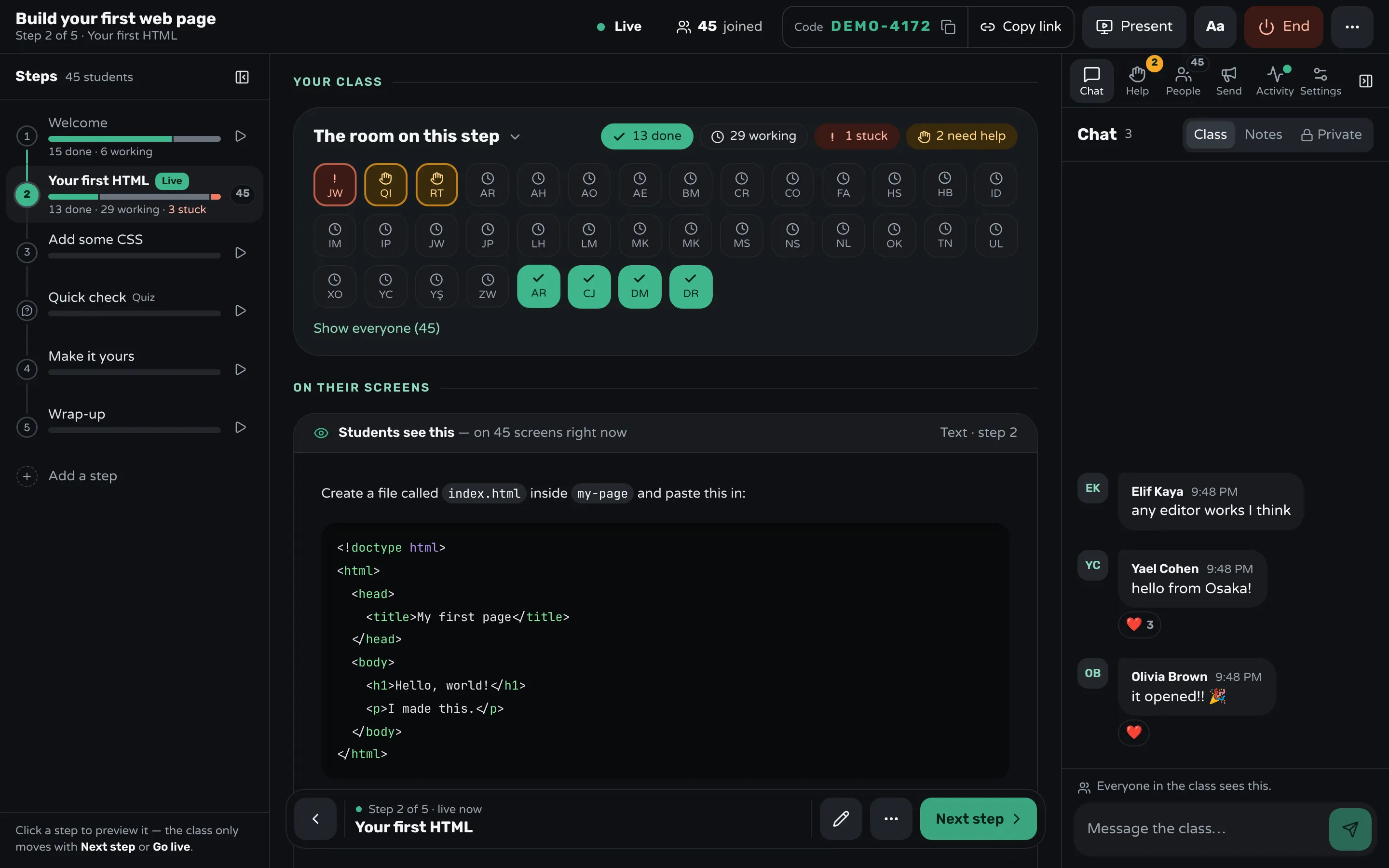
In Workshopy the room on each step shows this directly: one square per student, green when they pressed Done, a clock while they're still working, amber when they asked for help. The step outline beside it counts each step's done, working and stuck students, so you see a step where the class is piling up before anyone says a word.
Help the right student first
Help whoever has waited longest first. A queue you can see keeps the loudest student from taking every turn. If three students are stuck on the same line, stop and explain it once to the whole room instead of three times.
In Workshopy, Need help on the student's screen sends you a request, with a note if they add one ("Where exactly is the head?"). The Help tab lists requests oldest first, each with Go to step and Resolve, and a request that has waited more than five minutes turns red.
Afterwards: find the step that lost them
The step where most students got stuck is the step to rewrite. It probably asks for two things at once, or assumes something you never taught. Workshopy's report shows, for every class you run, how many students finished each step, how many got stuck or asked for help, and how long they waited for an answer.
Frequently asked questions
Isn't a done button easy to fake?
Some students will press it early. That's fine: the signal is for spotting who is far behind, not for grading. When a step really matters, ask for something concrete as well, such as pasting the output in the chat, or add a short quiz step.
Does this work in a remote or hybrid class?
Better than raised hands do. A remote class has no hands to see at all, while a status each student sets from their own screen shows you the whole room, wherever they are.
Will students see who is behind?
Not in Workshopy. Each student sees only their own progress; the room with everyone in it is the teacher's view.
Keep reading
How to track participant progress in real time
How the per-step status model works — in progress, done and stuck — and how the dashboard turns it into a live view of who needs help.
2 min read · 12 Sept 2026
Run a live classHow to run a hands-on training on Zoom or Teams
Give people a done and a help signal that stays until you read it, take written help requests in order, and stop the class only on purpose.
7 min read · 22 Oct 2026
Run a live classHow to keep a whole class on the same step
Decide step by step whether the class moves together or at its own pace, check who is behind before you move on, and regroup in one move.
2 min read · 19 Oct 2026
See it with a class of 45. No sign-up.
The live demo runs the real product with a simulated class. When you're ready, start free.