
How to use exit tickets in a hands-on lesson
By the Workshopy teamPublished 7 min read
An exit ticket is one or two questions every student answers in the last five minutes of a lesson, on their own, before they leave. In a hands-on lesson, make the first question a small task that uses what they practised today, and the second one "What is still unclear?". Read the answers the same day in two piles, got it and didn't, and open the next lesson with what the second pile has in common.
What an exit ticket is for
An exit ticket answers one question for you: who can do today's skill without help, and what the others are missing. It is not a test, a grade or a survey of how the lesson felt. Brown University's Sheridan Center puts it plainly: exit tickets collect feedback on students' understanding at the end of a class, and they should not be part of formal assessment.
That is also what makes it different from a check during the lesson. A check for understanding tells you whether to move on now. An exit ticket comes too late to change today's lesson, so it changes the next one: what you review, who you sit with first, which step you rewrite.
In a hands-on class the ticket has a second job. During the lesson students work with their neighbours, the teacher's screen and the instructions in front of them. The exit ticket is the one moment they do the skill alone, so it shows who learned it and who followed along.
Write one question that uses today's skill
Ask students to do the thing the lesson taught, in a small new case, not to describe it. "Explain what a CSS selector is" tells you who can repeat your words. "Write the rule that makes every paragraph grey" tells you who can use one.
Good exit questions in a hands-on lesson:
- A tiny task with a result: "Which rule turns the heading green?", "What does this formula return for row 4?", "Write the command that shows which files changed."
- Find the mistake: show three lines with one error and ask which line breaks, and why.
- Predict the output: a short piece of code or a spreadsheet formula, and "What will it show?"
Write it so the wrong answers tell you something. If the right answer to "how much space does margin: 40px leave on the left?" is 40, a student who answers 80 has added both sides. That is a different explanation from the one a student who answers "none" needs. When you can list the likely wrong answers before the class, you can sort the tickets in seconds afterwards.
Keep the whole ticket to one or two questions and five minutes at most. The Sheridan Center suggests no more than five minutes, perhaps only one or two. A ticket that takes longer gets rushed at the door, and rushed answers tell you nothing.
Add one question in their own words
The second question asks what is still unclear. The classic form is the muddiest point: "What was the muddiest point in today's lesson?" Marzano, who sorted exit slip prompts into four kinds, puts this one first among the prompts that give you formative data: "What are you most confused about regarding what we did in class today?"
Make it concrete enough to answer. "Any questions?" gets a blank. "Which step would you be least sure about doing again at home?" gets an answer you can act on, because it names a step.
Greg Wilson's version for workshops, in Teaching Tech Together, is the minute card: before each break, learners write one thing they think will be useful on a green sticky note and one thing that was too fast, too slow, confusing or irrelevant on an orange one. He reviews them over coffee and says it takes less than five minutes to see the patterns in a class of 40. In a day-long workshop that means an exit ticket before every break, not just at the end.
Leave this question unsigned, or at least ungraded. Wilson's minute cards are anonymous on purpose: students say what confused them when admitting it costs nothing.
Give it at the right moment
Hand it out while students still have five quiet minutes, not as they pack. Two habits help:
- Stop the practice on time. Give a two-minute warning before the ticket, so nobody is halfway through a task when it appears.
- Put it where they already are. On a slip of paper for a paper class, on their screen for a laptop class. Students who have to open a new form or log in to something lose two of the five minutes.
Collect every ticket, including the blank ones. A student who wrote nothing on the task question is telling you something too.
Read them in two piles
Read the tickets the same day, while you remember the lesson. Sort by the task question first:
- Got it: the answer is right.
- Didn't: the answer is wrong or missing. Sort this pile again by the wrong answer, so each smaller pile is one misunderstanding.
Then read the second question across both piles. Look for the step or idea that comes up more than twice.
What you do next depends on the size of the piles. Marzano's advice for the confusion prompt is the rule of thumb: if most students name the same topic, teach it again the next day; if the confusion is spread out, work with small groups and let students who understood it help. In numbers:
| What the tickets show | What to do in the next lesson |
|---|---|
| Nearly everyone got it | Start the new material. Sit with the few who missed it during the first task. |
| One wrong answer stands out | Open with five minutes on that one mistake, aimed at what that wrong answer shows. |
| The class is split | Open with a short warm-up on the same skill, and pair students from the two piles. |
| Most got it wrong | Teach it again a different way before going on. The lesson moved too fast. |
Tell the class what you found. "Half of you added both margins together, so let's look at that first" shows students the tickets are read, and that is what keeps their next answers honest.
Keep the tickets that changed something
A ticket that shows the same confusion lesson after lesson points at the lesson, not the students. Keep a note of each step that produced a pile of wrong answers, and rewrite that step before you teach it again: a clearer example, a smaller task, an extra check before it. Over a few classes the tickets become a list of the steps your lessons need to fix, which is worth more than any single day's answers.
Exit tickets in Workshopy
In Workshopy the exit ticket is the lesson's last step, so it reaches every student's screen when the class gets there and nothing has to be handed out.
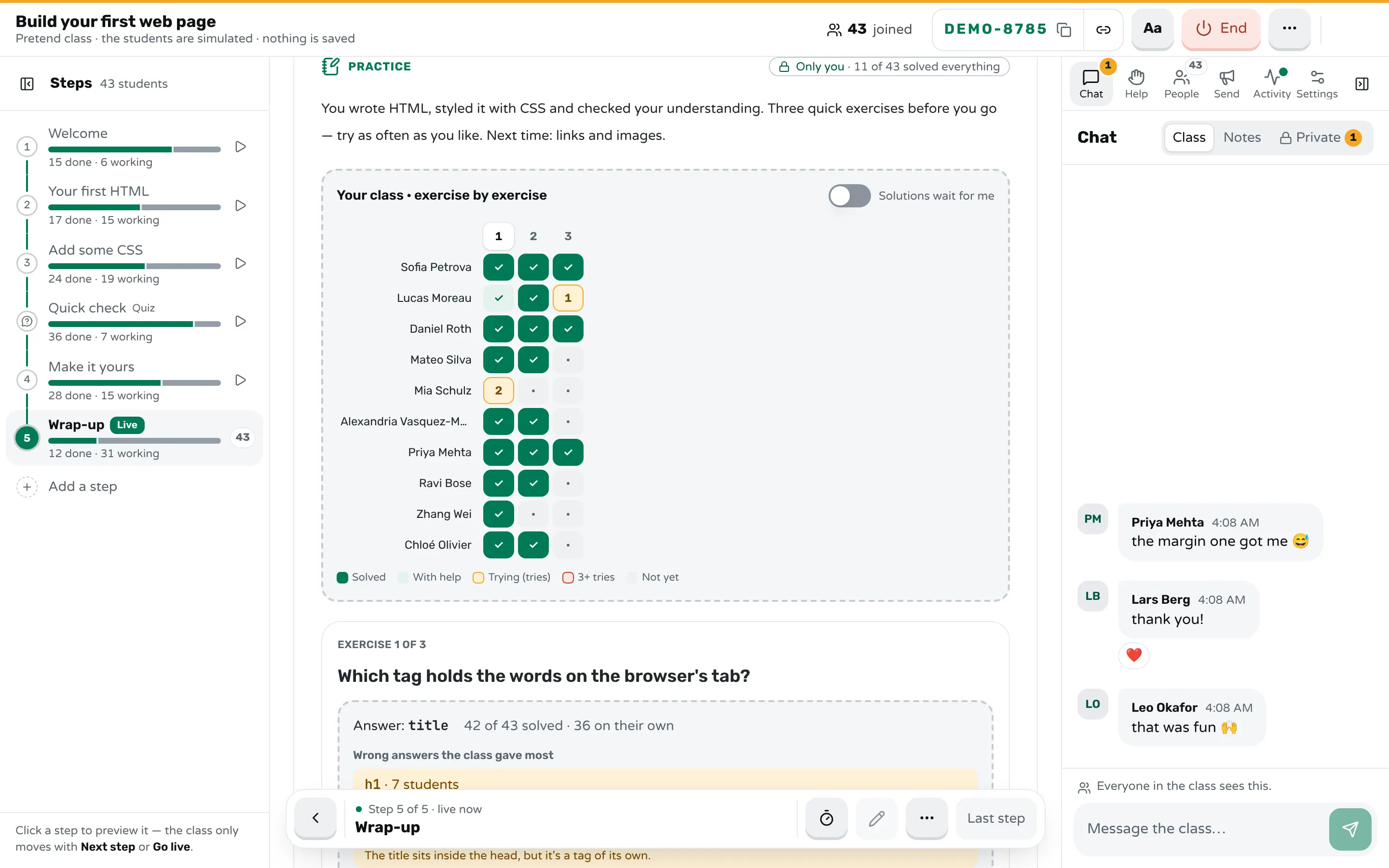
A practice step is the closest match. #[practice] starts it, each ## heading is a question, and an answer: line holds the answer. A mistake: line gives the words a student sees for a wrong answer you expected:
#[practice] Before you go

## How many pixels of space does `margin: 40px` leave on the left?
answer: 40
hint: One number after margin means the same space on every side.
mistake: 80 → It's 40 on each side, not 40 + 40.
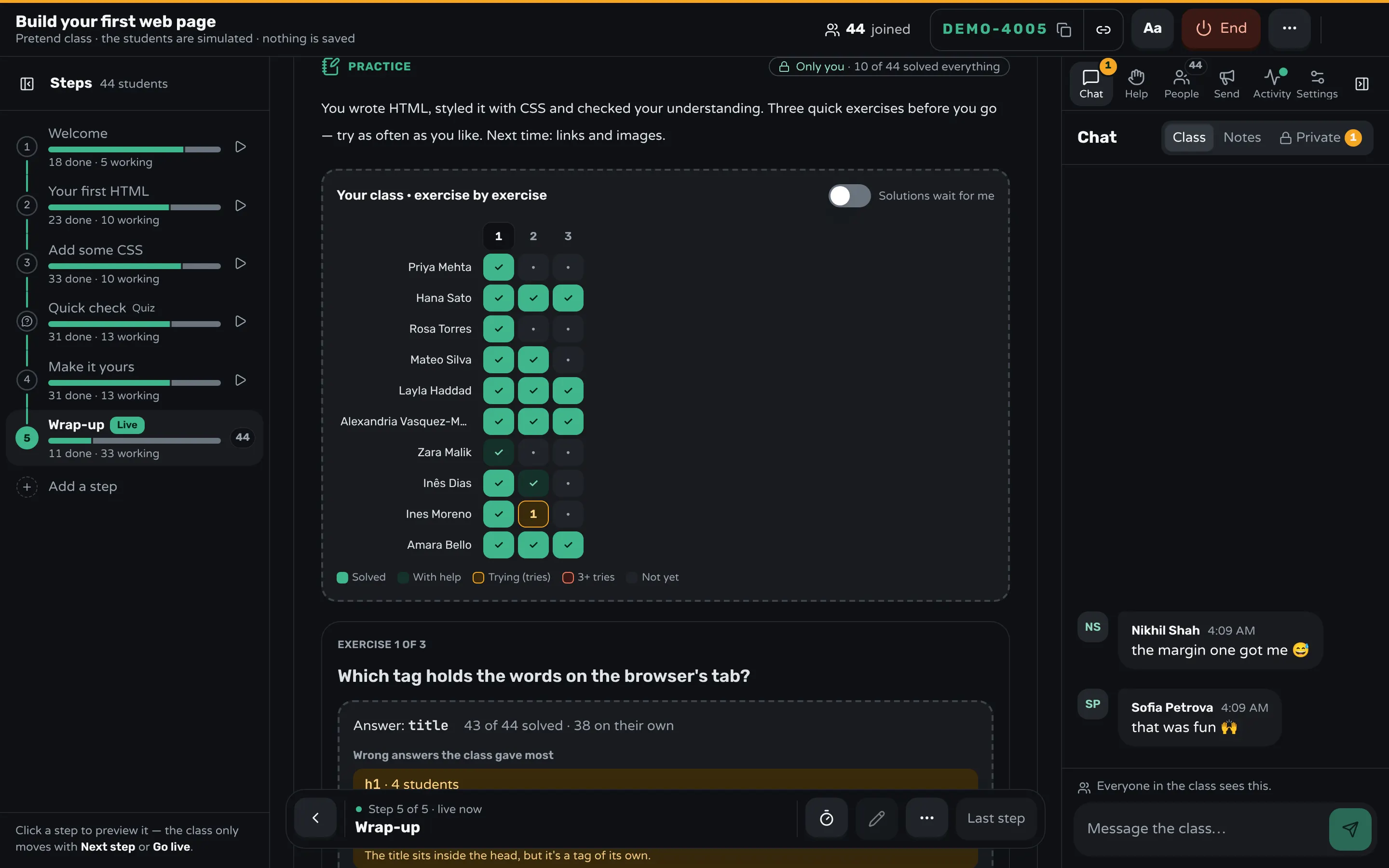
Students check their own answers, try again and open a hint; nothing is graded. On your screen, marked Only you, is a grid of every student against every question: solved, solved with help, still trying, or not started. Under each question you see the wrong answers the class gave most and how many gave each, which is the sorting into piles done for you.
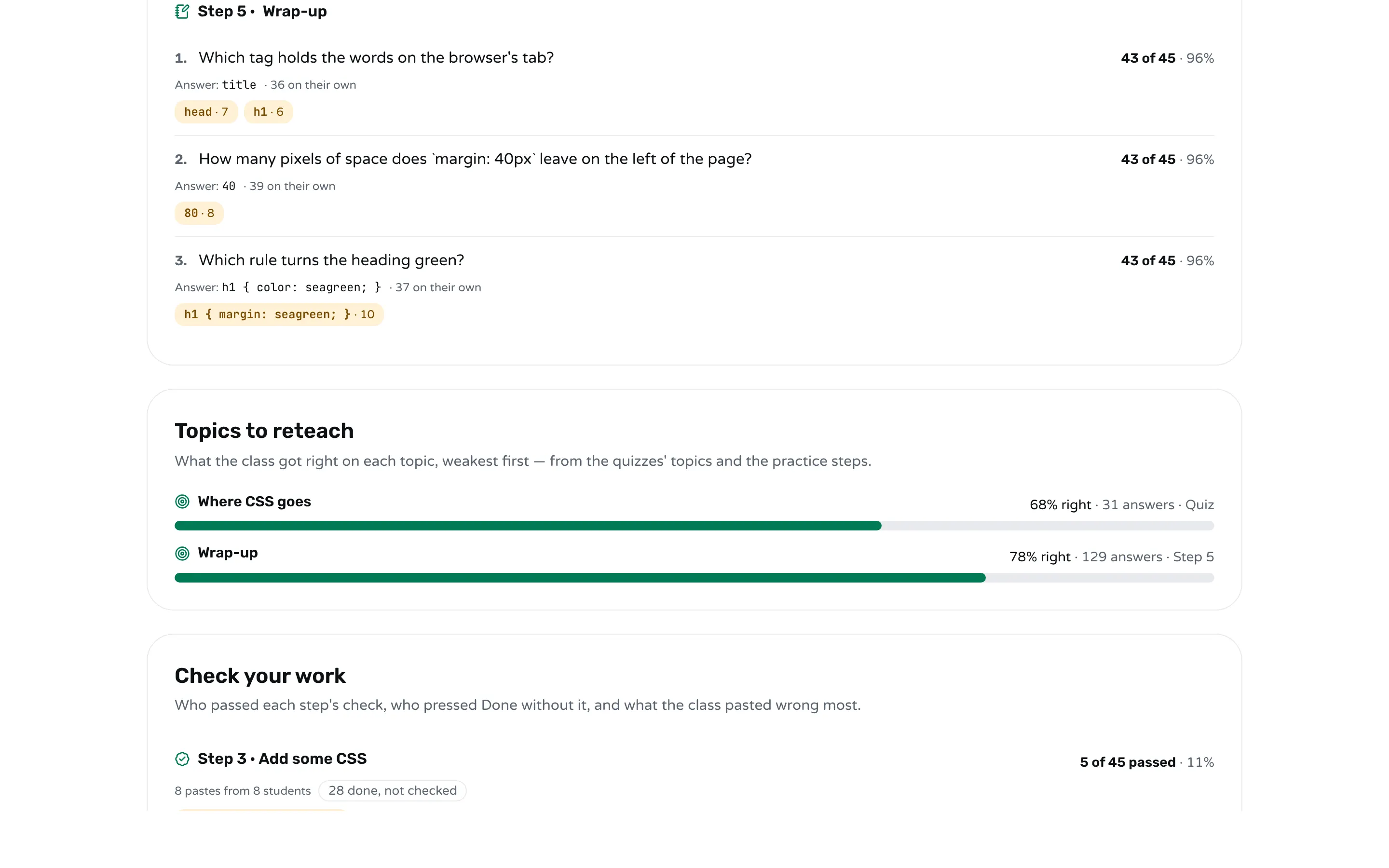
A quiz step (#[quiz]) works when you want one answer per student without retries; how to add a quiz to a workshop has the format. Add a line such as topic: Selectors under a question, and the report after the class lists each topic with how much of the class got it right, weakest first, and marks the ones worth teaching again.
For the muddiest point, a student can write to you privately from the chat's Teacher view, and only you see it.
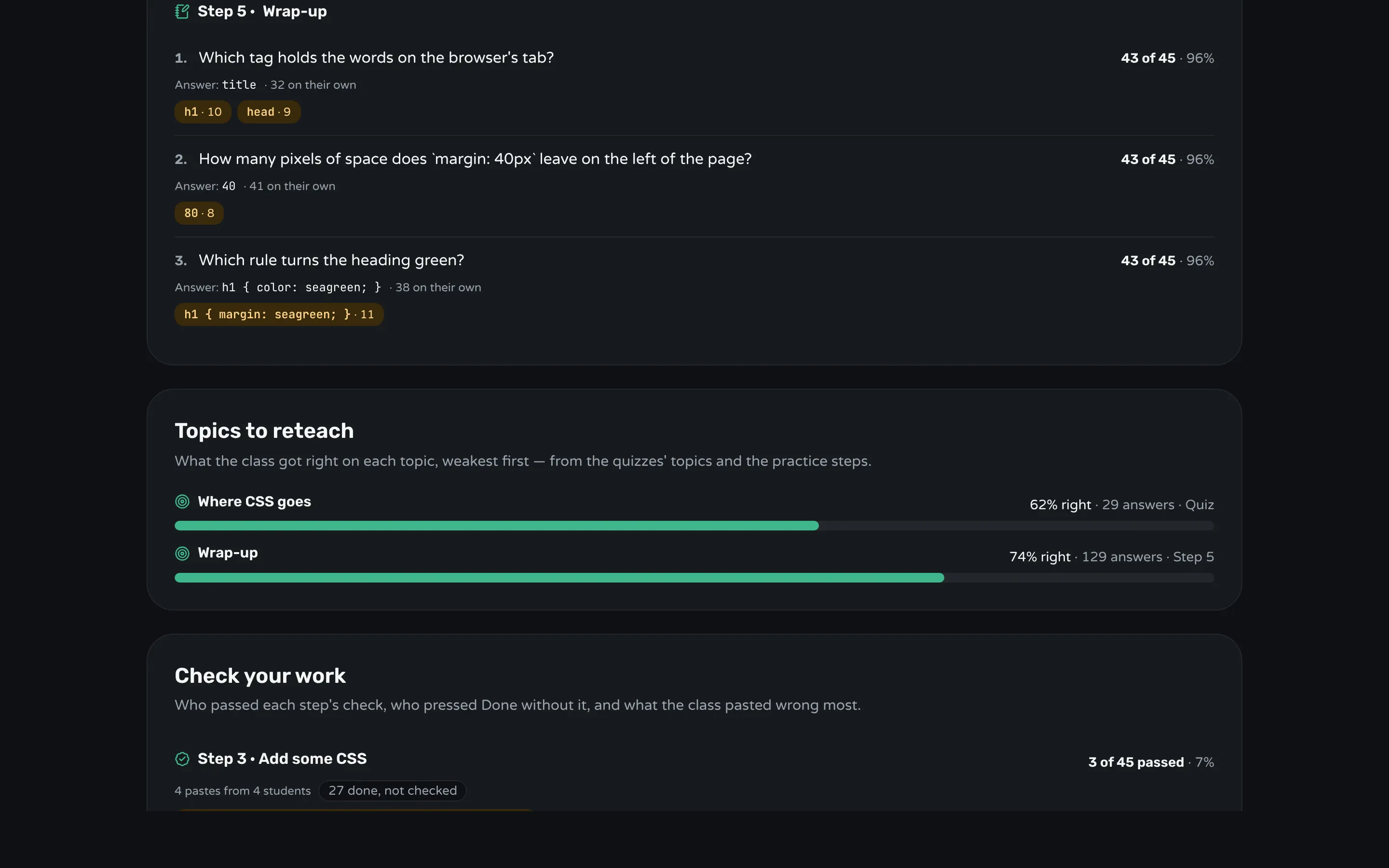
After the class, the report keeps the ticket: each question with how many solved it, how many on their own, and the wrong answers the class gave, with how many students gave each. Read it when you plan the next lesson.
Frequently asked questions
How long should an exit ticket take?
Five minutes at most, and one or two is better. One task question and one question about what is still unclear is enough to plan the next lesson.
Should exit tickets be graded?
No. They tell you what to teach next, and students answer honestly only when a wrong answer costs them nothing.
What is a good exit ticket question?
A small new task that uses the skill the lesson taught, with wrong answers you can predict. "Which rule turns the heading green?" is better than "What did you learn today?" because the answer shows whether they can do it.
How is an exit ticket different from an end-of-workshop survey?
An exit ticket asks what students can do; a survey asks how the workshop was for them. Ask both if you need both, but keep them apart. Getting useful feedback at the end of a workshop covers the survey.
What do I do with the answers?
Sort them into got it and didn't, sort the second pile by the wrong answer, and open the next lesson with the largest pile.
Keep reading
How to check for understanding without stopping the class
Ask one question everyone answers at once, write it so wrong answers show the mistake, and decide in a minute what to teach next.
7 min read · 20 Oct 2026
Run a live classHow to get useful feedback at the end of a workshop
Ask before people leave, ask a few specific questions about usefulness, read the answers for patterns, and tell the next group what changed.
5 min read · 21 Oct 2026
Run a live classHow to measure whether a training session worked
Decide what people should be able to do, measure it during the session and with a task at the end, and check weeks later if they use it.
5 min read · 21 Oct 2026
Ready-made lessons from the library
Intro to Git — Snapshots, Branches & Sharing
A short, hands-on first lesson in Git for complete beginners. Students build the mental model one idea at a time — snapshots, the three areas…
10 steps · Free
Teacher trainingMeet Workshopy — A Live, Interactive Product Tour
A live, interactive product tour of Workshopy for new users. It runs as a real Workshopy session, so the audience experiences the product as participants while…
16 steps · Free
ScienceHow Epidemics Spread — R, Curves and Herd Immunity
An interactive first look at how infectious diseases spread through a population — and what stops them.
9 steps · Free
Learn any of them on your own, free, or copy one and teach it live. Browse the library
See it with a class of 24. No sign-up.
The live demo runs the real product with a simulated class. When you're ready, start free.