
How to plan a lesson with Claude or ChatGPT
By the Workshopy teamPublished 7 min read
Give the AI what only you know: who the students are, what they can already do, how long the class is, and what they should be able to do at the end. Ask for the lesson as short steps, each with one idea, a task and a way for students to check they got it right, not as a plan document. Then do every step yourself before the class: run the code, check the facts, and double the timings. The AI writes a good first draft quickly; whether it works in your room is still yours to find out.
What an AI is good at, and what it isn't
The best evidence so far is a randomised trial the Education Endowment Foundation ran in 2024 with 259 secondary science teachers in 68 schools. Teachers given ChatGPT and a short guide spent 56.2 minutes a week preparing lessons, against 81.5 minutes for teachers asked not to use AI, a saving of 25.3 minutes. An expert panel that didn't know which group made which resources found no evidence the quality differed. Most teachers didn't hand over whole lessons: they used it for one or two parts, most often to write questions and quizzes or to find ideas for activities.
Two smaller studies show where the drafts fall short. When teacher educators blind-rated social studies lessons, the ChatGPT plans scored higher than student teachers' plans on structure, clarity and matching the assessment to the objectives, while the human plans had more depth, richer inquiry and more student-centred work. A study of language lesson plans found the drafts generally good, but the same prompt sometimes gave very different plans, and some leaned on teaching practices from the last century that research has since moved past.
So use it for what it does well: a structure, a first draft of the steps, questions, examples, variations. Keep for yourself the judgement about your students, your subject and what actually happens when 25 people try the task.
Tell it what only you know
A prompt like "plan a lesson on CSS" gets a lesson for an imaginary average class. Every guide that ranks for this question says to be specific; here is what specific means for a hands-on lesson:
- Who the students are and what they can already do. "Adults on their second evening, they have made one HTML page with a heading and a paragraph."
- The end result, as something they do. "By the end, each student has changed the colours and font of their own page with CSS."
- The time, and what else happens in it. "60 minutes, the first 5 are lost to logging in."
- Their tools. "A text editor and a browser on school laptops. No installing anything."
- What usually goes wrong. You know this and the AI doesn't. "Half of them save the file in the wrong folder."
Then say what shape you want back:
Plan a 60-minute hands-on lesson for adult beginners on their second evening.
They have one HTML page with a heading and a paragraph. By the end, each of
them changes the colours and font of their own page with CSS. They work in a
text editor and a browser on school laptops and can't install anything.

Write it as 5 or 6 steps. Each step has: one new idea in two or three
sentences, an example they can copy, a task of one or two actions, and a
sentence that starts "You're done when" with a result they can see on their
screen. Add how many minutes each step takes and the mistake beginners make
most often on it. Don't write slides or a lecture.
If your school uses a lesson plan form, paste its headings and ask for those too. But keep asking for the steps students follow: a plan written for an observer rarely tells a student what to do next.
Ask for steps, not a plan document
The typical AI lesson plan has an objective, a hook, direct instruction, guided practice, independent practice and an exit ticket. That reads well and tells you little about the twenty minutes in the middle, which is where a hands-on class succeeds or falls apart. Ask instead for the steps a student works through, each one small enough to finish in a few minutes and ending in a result they can check. The guide on breaking a lesson into small steps explains how to size them.
When a step comes back with two new ideas in it, ask the AI to split it. When a step ends in "students explore" or "students discuss", ask what a student will have on their screen when they're done. If there's no answer, the step isn't a task yet.
Ask twice and compare
The same prompt can give very different plans, so don't take the first one. Send the prompt again in a new chat, or ask for "a different approach to the same lesson", and put the two side by side. Often one has the better order and the other the better tasks. Taking the best of both is quicker than fixing one draft line by line, and it shows you which parts of the plan are a real choice.
Check it before you teach it
The UK Department for Education's guidance on AI in schools puts it plainly: "Any content produced requires critical judgement to check for appropriateness and accuracy." For a hands-on lesson, checking means doing:
- Run every example and every task yourself, on the same kind of machine the students use. Code that looks right often isn't, and a menu path can be from an older version of the software.
- Check every fact, name and date against a source you trust. Open every link and every video it suggests; some won't exist.
- Read each "You're done when" line. Could a student tell from their own screen that they're done? If not, rewrite it.
- Double the timings. An AI's minutes are a guess for an ideal class. Time yourself doing the steps, then expect a class to take two or three times as long.
- Look for what doesn't fit your room: a task that needs an install your laptops block, group work in a class of eight, an example your students won't recognise.
Whatever you change, note why. "The draft styled an h2; our page has an h1" is the kind of note that saves you the same check next term.
Keep student data out of the prompt
You don't need students' names, marks or work to plan a lesson, so leave them out. The same DfE guidance recommends that personal data is not used in generative AI tools, and that students' original work isn't used to train AI models without permission. Describe the class instead: "a third of them are new to computers" plans just as well as a list of names.
After the class, fix the plan
The draft was a guess; the class was the test. Straight after the lesson, write down which step took longest, where most students got stuck and which question they asked most. Paste that into the same chat with the plan and ask the AI to rewrite those steps: split the long one, add the missing example, answer the common question in the step itself. The second version of a lesson is usually the one worth keeping.
Build it in Workshopy
In Workshopy a lesson is a template made of steps, and an AI app can write it for you. Connecting Claude, ChatGPT or another AI app is open to every account: the app reads Workshopy's writing guide on its own, so you can paste the prompt above and ask it to "make this a Workshopy template". Each step it writes can carry a Check your work block, where students paste what they got and are told at once whether it's right, and a teacher block for notes only you see, such as the timing and the usual mistake. If you'd rather work in a chat app that isn't connected, ask it for the lesson as Markdown with one # line per step and bring it in from the Templates page with New template, then Import Markdown.
Open the template and read every step, in the editor's Visual mode or in Markdown. The editor's top bar shows about how long the lesson takes. Before an app changes a template, Workshopy keeps the lesson as it was, so Version history in the editor's ⋯ menu can put back what you had. Then press Try it to run the lesson with a pretend class: you see the room fill, students finish and ask for help, and where the lesson drags.
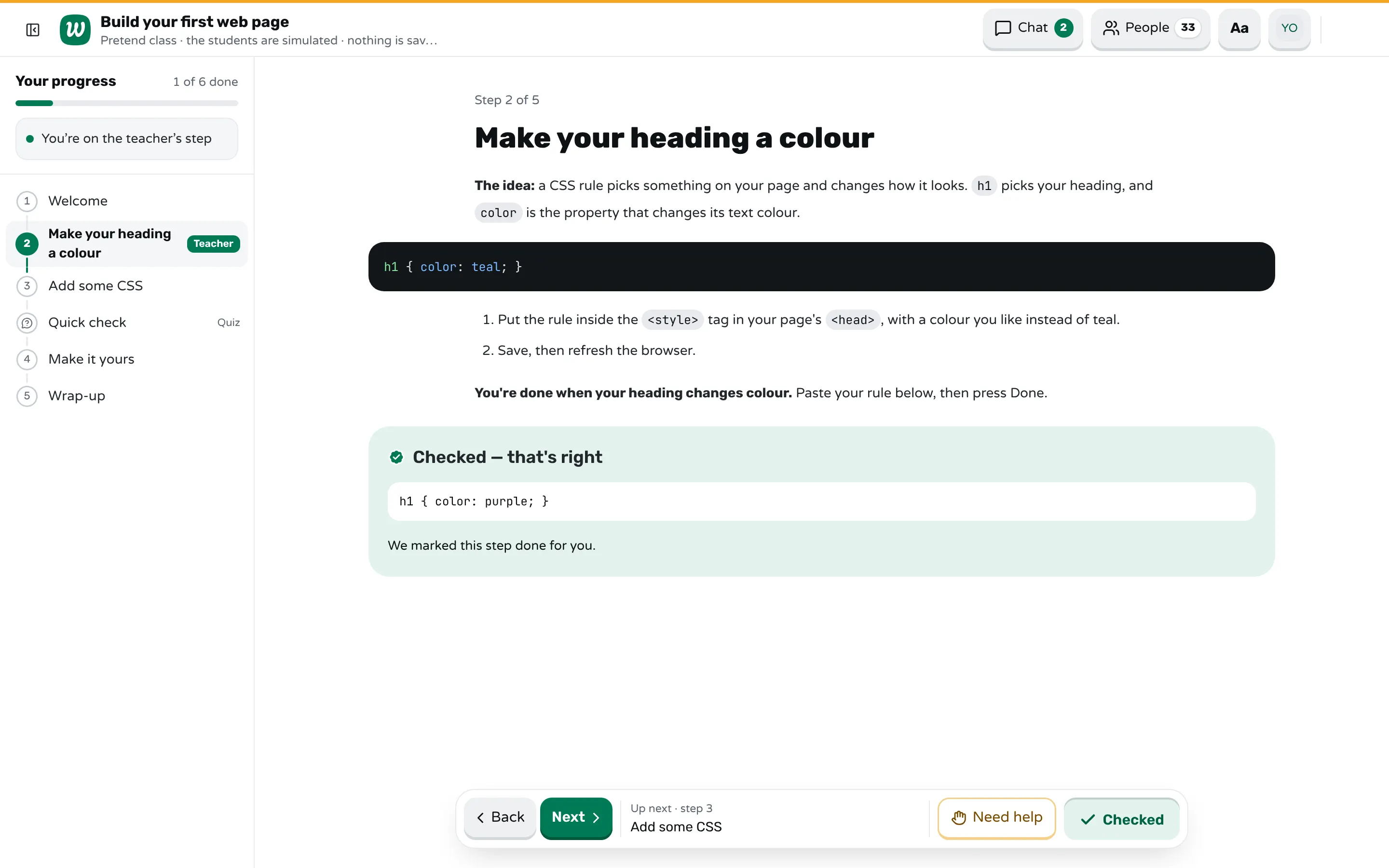
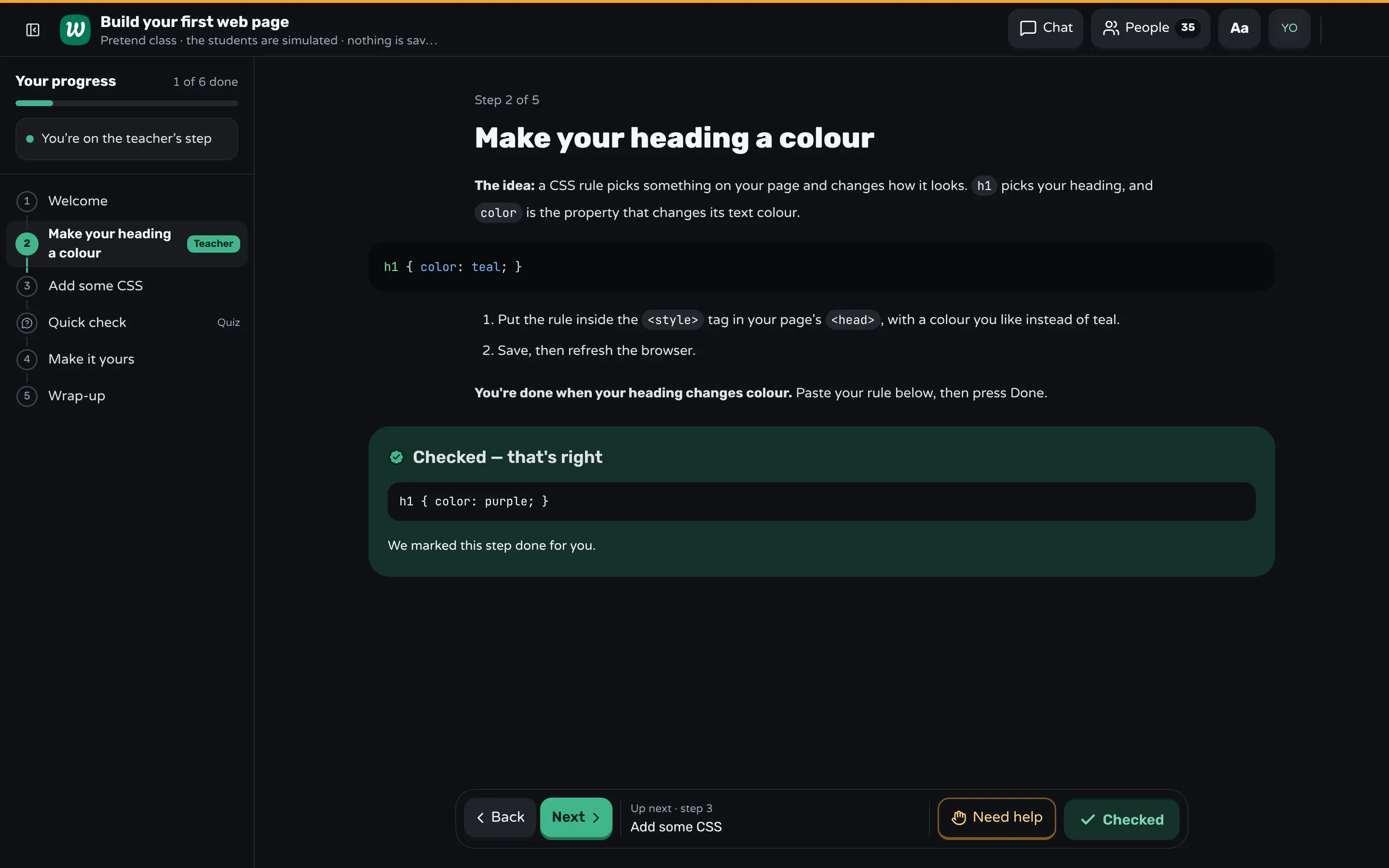
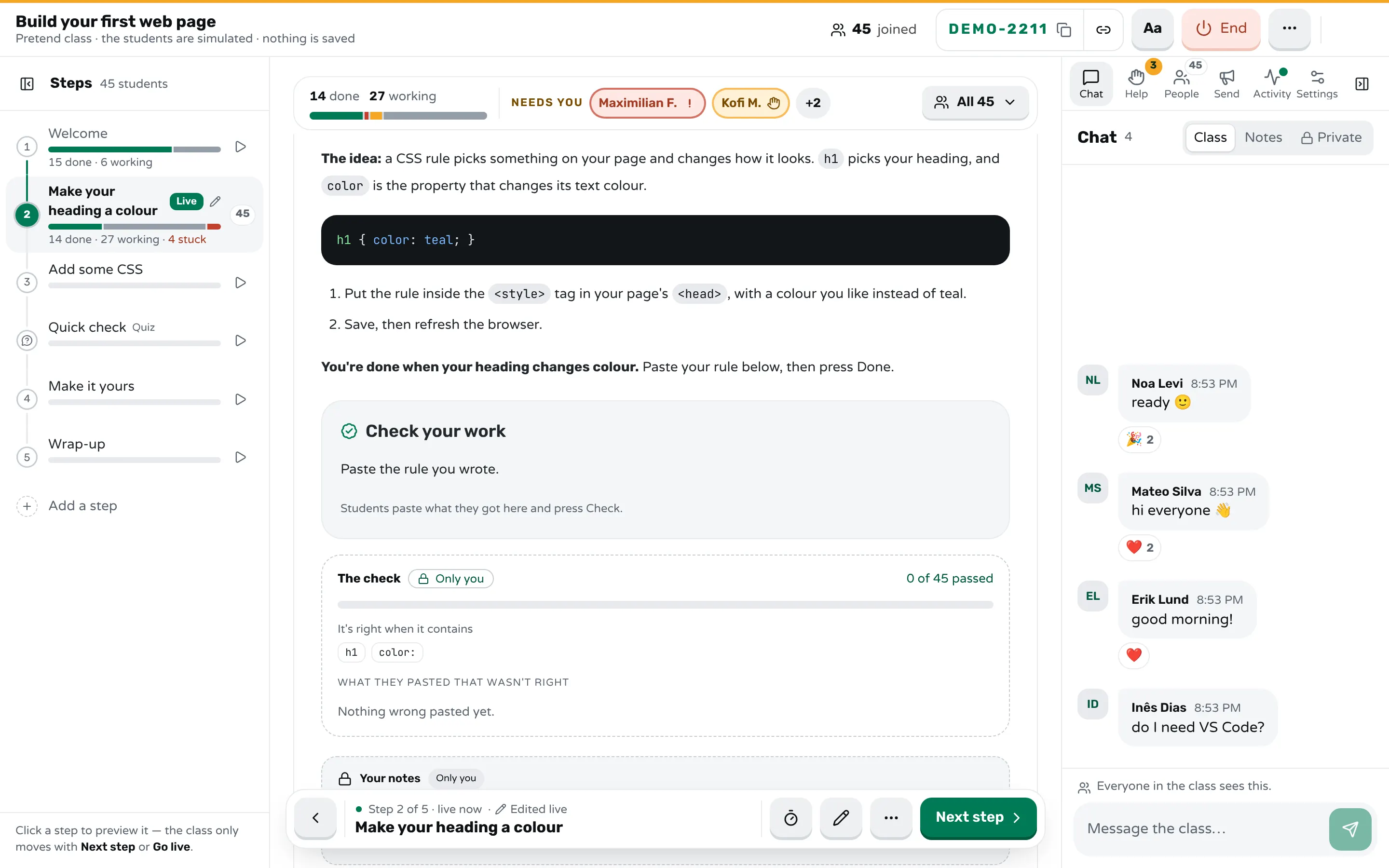
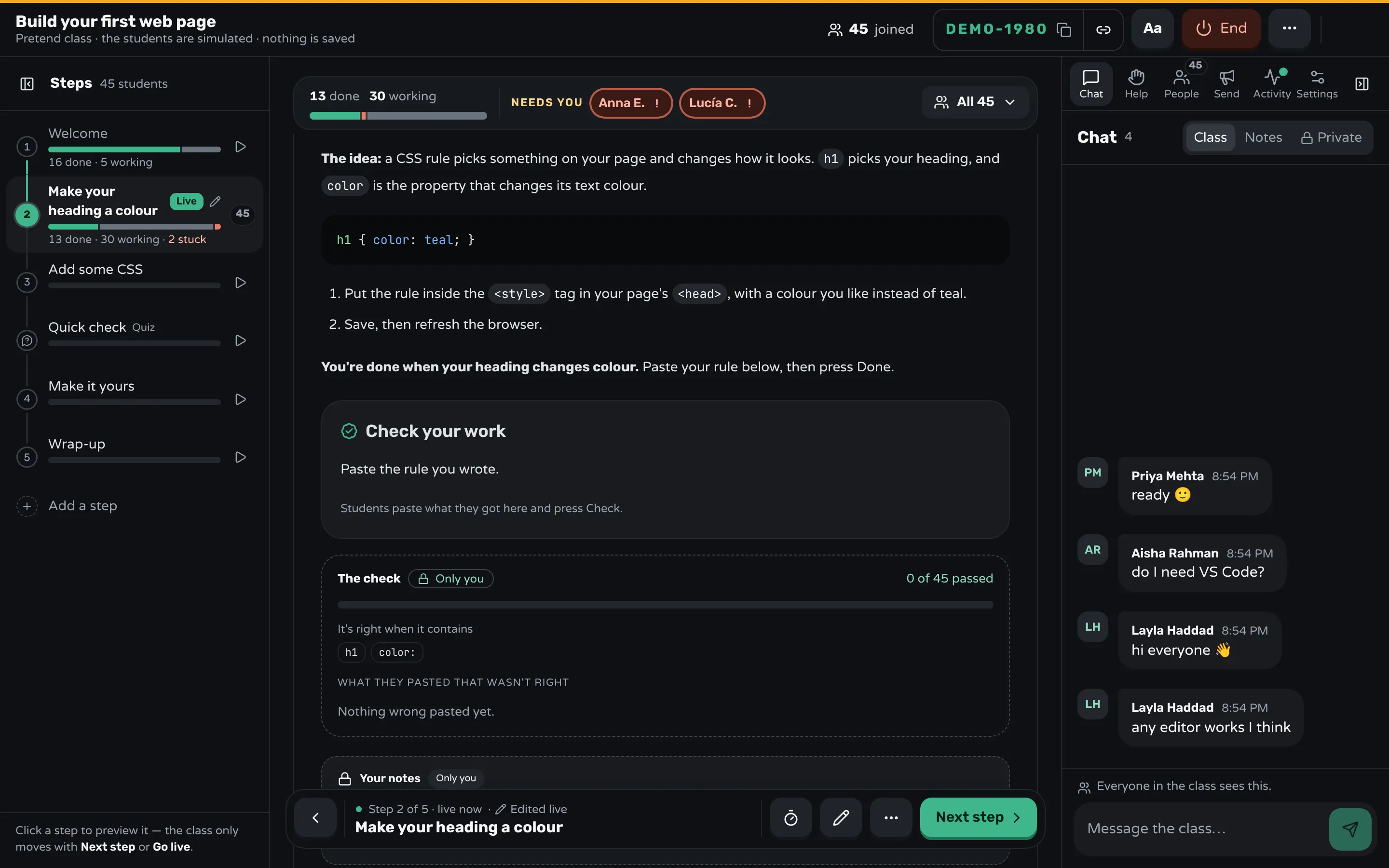
In class, the room shows who pressed Done, who is still working and who pressed Need help on each step, and the report afterwards shows, step by step, how many finished, how many got stuck or asked for help, and how long they waited. That is the list to bring back to the AI. A connected app can also read a finished class's numbers itself, never a student's name or anything they wrote, so you can ask it "where did my last class get stuck?" and have it fix those steps.
Sources
- Roy et al., ChatGPT in Lesson Preparation: A Teacher Choices Trial, evaluation report (2024)
- Dornburg and Davin, To what extent is ChatGPT useful for language teacher lesson plan creation? (2024)
- SUNY Geneseo, Can ChatGPT Make Quality Social Studies Lesson Plans? The Answer Surprised Us (2025)
- Department for Education, Generative artificial intelligence (AI) in education (2025)
Frequently asked questions
Is Claude or ChatGPT better for lesson planning?
Both write good first drafts, and the research so far is mostly on ChatGPT. What matters more is the prompt and the checking: tell either one who the class is and what they should do at the end, and test the result yourself.
Does planning with AI actually save time?
In the Education Endowment Foundation's trial, science teachers using ChatGPT spent about 31% less time preparing lessons each week, with no evidence of lower quality. Most of the saving came from using it for parts of a lesson, such as questions and activity ideas.
Can I use an AI lesson plan as it is?
Not safely. Drafts can contain wrong facts, code that doesn't run, links that don't exist and timings for an ideal class. Do every step yourself before you teach it.
Is it OK to put students' names or work into ChatGPT?
You don't need to for planning, and UK government guidance recommends against putting personal data into generative AI tools. Describe the class in general terms instead.
Keep reading
How to break a lesson into small steps
List what students must be able to do, give each skill a step with one new idea, and end every step with a result students can check.
8 min read · 2 Nov 2026
Build lessonsHow to turn slides into a hands-on lesson
Sort your slides into what you explain, show and ask, turn every slide that shows into a step students do, and end each step with a check.
8 min read · 9 Nov 2026
Using WorkshopyEdit your templates from ChatGPT, Claude and other AI apps
Connect ChatGPT, Claude or Codex to Workshopy over MCP: what an app can do with your templates, what it can't, and what to ask it.
6 min read · 6 Oct 2026
Ready-made lessons from the library
Intro to Git — Snapshots, Branches & Sharing
A short, hands-on first lesson in Git for complete beginners. Students build the mental model one idea at a time — snapshots, the three areas…
10 steps · Free
Teacher trainingMeet Workshopy — A Live, Interactive Product Tour
A live, interactive product tour of Workshopy for new users. It runs as a real Workshopy session, so the audience experiences the product as participants while…
16 steps · Free
Teacher trainingTrain the Trainer: How to Design a Hands-On Workshop
A train the trainer workshop on designing hands-on sessions: write objectives you can see, plan an hour of talks, exercises and checks, find who's stuck.
11 steps · Free
Learn any of them on your own, free, or copy one and teach it live. Browse the library
See it with a class of 24. No sign-up.
The live demo runs the real product with a simulated class. When you're ready, start free.