
How to teach Git to beginners in a workshop
By the Workshopy teamPublished 7 min read
Teach a handful of commands on day one, init, status, add, commit and log, and leave branches, merges and rebasing for later. Draw where each command moves a file before anyone types it, have students run git status after every command, and end each step with output they can compare with what you expect. Most beginners don't get lost in Git's commands; they get lost because they can't see what Git did.
Teach five commands, not fifty
Git has dozens of commands, and a beginner needs about five to do something useful by the end of the first hour. The Software Carpentry instructor notes for their Git lesson put it bluntly: version control may be the most important topic they teach, but Git is the most complicated tool, so teach only the fundamentals and skip branching, hashes and commit objects with novices.
A first workshop that works covers one loop and repeats it:
git initonce, to start tracking a folder.git statusconstantly, to see what Git sees.git addto choose what goes into the next save.git commit -m "…"to save it.git log --onelineto see the saves so far.
Once that loop feels routine, add git diff to see what changed, and, if you have the time and everyone has an account, git push to a hosting service. Each new command is a new step, never two in one.
Start with five minutes on why anyone bothers. The same instructor notes suggest a short overview of what version control does for learners before the hands-on part: going back to yesterday's version, seeing who changed what, working on one project with other people. Beginners who know what problem Git solves put up with its vocabulary.
Draw where every command moves a file
Git's hardest idea for a beginner is the staging area: a change can be saved in the file, added to the next commit, or committed, and those are three different places. Pro Git calls them the working tree, the staging area and the Git directory, and a file moves between them with add and commit.
Draw it before anyone types, and keep the drawing on the board all day. Three boxes side by side, labelled "your folder", "next commit" and "history", with an arrow for each command. When a student asks why their commit is empty, point at the drawing: the change is still in the first box. The Carpentries' notes recommend drawings throughout this lesson, and a diagram of the separate repositories once a remote appears, since beginners easily mix up Git and the website that hosts it.
Their Git lesson has a good picture for the staging area too. git add chooses who is in the photo, and git commit takes it. Skipping the choice, with git commit -a, is like calling everyone in for a group photo: someone ends up in it by accident.
Make git status the check after every command
Every Git command changes something students can't see. git status makes it visible, and it says in plain words what to do next. Have students run it after every command for the whole first workshop, and say out loud what you expect it to print before you run it yourself.
That gives every step a result students can check without you:
- After
git init: "No commits yet". - After saving a new file: "Untracked files", with the file's name in red.
- After
git add: "Changes to be committed", the name in green. - After
git commit: "nothing to commit, working tree clean".
Put the expected output in the step itself, so a student can compare. If what they see doesn't match, they know before the class moves on, not twenty minutes later when a push fails. The same notes call git status the tool for diagnosing problems, such as a conflict resolved in the file but never added.
Plan for the mistakes everyone makes
Git workshops go wrong in the same places, so write the fix into the step before the class meets it. The Carpentries' instructor notes list the common ones:
- Running commands in the wrong folder. "fatal: not a git repository" means the student is outside the project. Show
pwdearly. - The editor that opens by itself.
git commitwithout-mdrops beginners into an editor they can't leave. Teach-mfrom the start, or set an editor everyone knows during setup; the Carpentries usenanobecause it shows its own shortcuts. - Someone else's name on their commits. Students copy your
git configline with your name and email in it. Make "check your name withgit config --list" part of setup. - A mistyped remote. The address pasted wrong means
pushfails;git remote -vshows what Git has. - Pushing before pulling once two people share a repository.
Do the installing before the day, from a setup page that ends in a check people run themselves (getting everyone set up in the first five minutes covers it). A Git workshop that starts with installs eats its own first hour.
Give every exercise a visible result
Practice should feel like a real project, but a tiny one: a folder with one text file, where each step changes a line and saves a commit. A step reads like "Add a line about Mars to planets.txt, add it, commit it with the message Add Mars, then run git log --oneline. You're done when you see two commits." The student checks the last sentence by looking at their screen.
Keep commit messages short and about what changed. The Software Carpentry lesson suggests starting each message with a summary under 50 characters, and the PLOS paper "Ten Simple Rules for Taking Advantage of Git and GitHub" repeats the old advice: commit early, commit often. Small commits also make the history readable in git log --oneline, which makes the next step, going back to an earlier version, easier to teach.
Save conflicts for the end, and save time for them. The instructor notes warn that conflicts come late in the lesson, when everyone is tired, and that both learners and instructor make more mistakes then. Plan a break right after.
How Workshopy checks each Git step
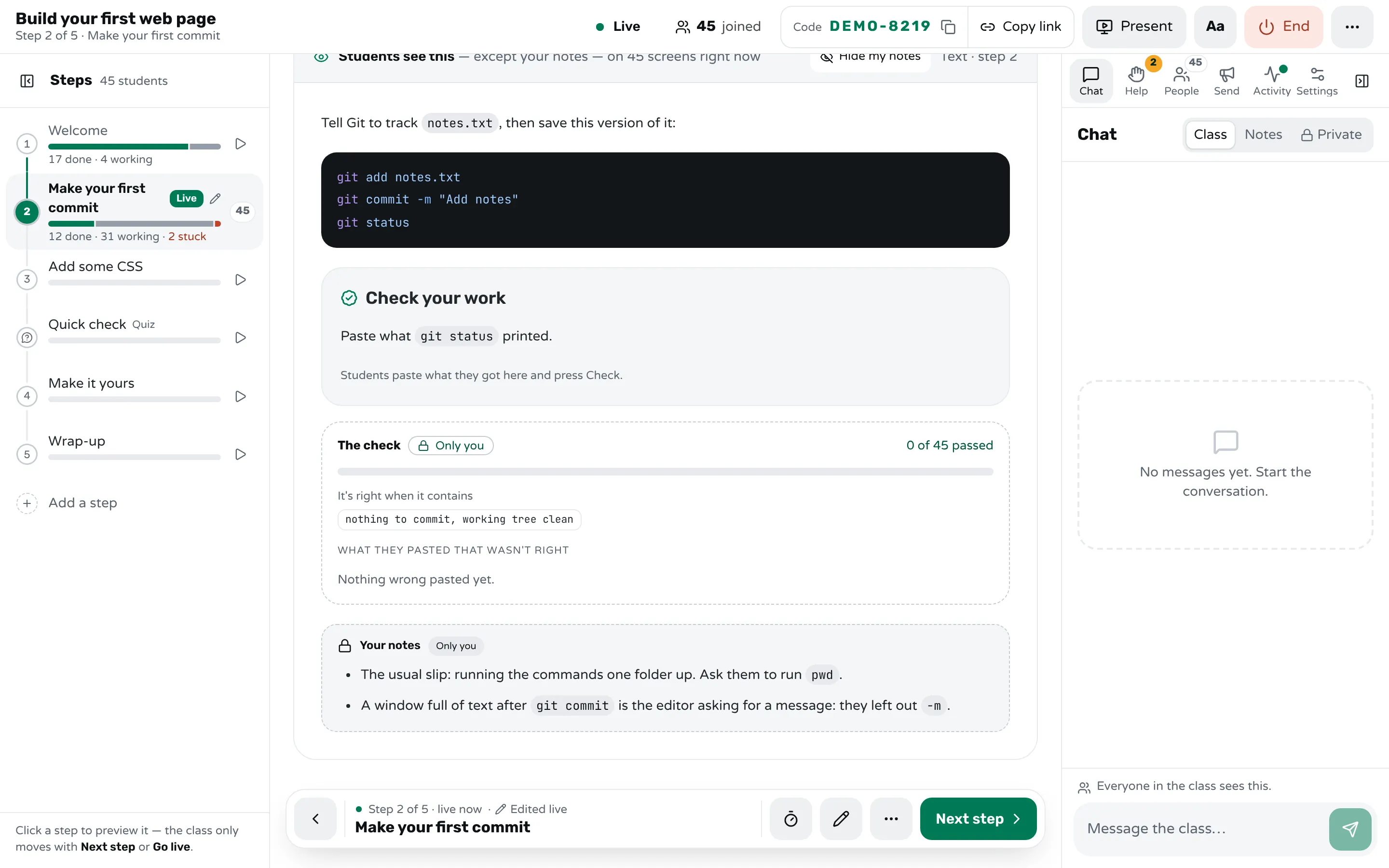
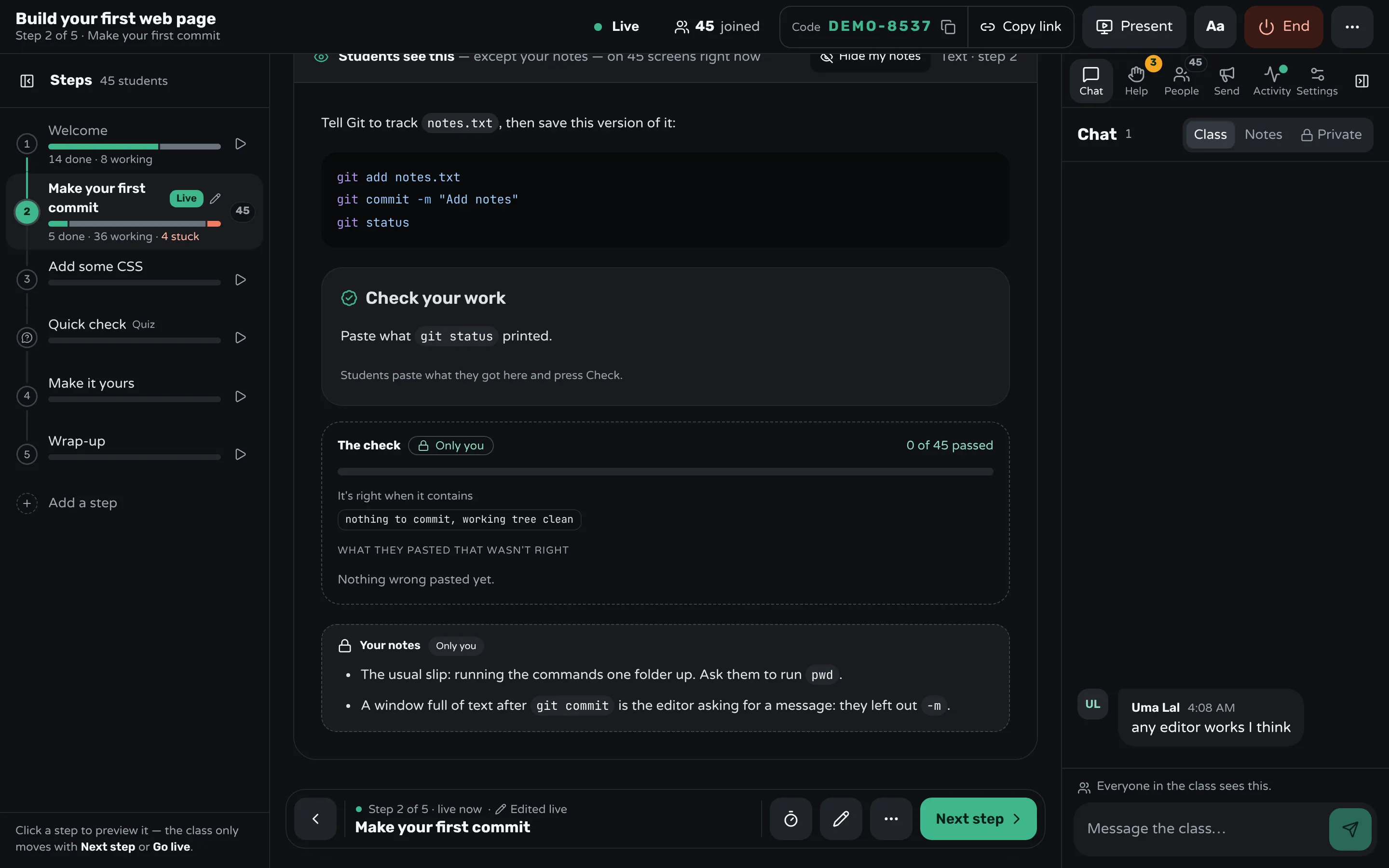
In Workshopy a workshop is a list of steps that students follow on their own screens while you watch the room. Write each Git step with its commands in a code block (students copy them with one press instead of reading them off a projector), then end it with a Check your work block: students paste what git status or git log --oneline printed and press Check. The server compares the paste with what you wrote, so the answer never reaches their screen.
```check
Paste what `git status` printed.

contains: nothing to commit, working tree clean

mistake: Changes to be committed → You staged the file but didn't commit it.
mistake: not a git repository → You're outside the project folder. Run `cd planets`.
hint: Run all three lines, in order, from inside `planets`.
```
A paste that holds one of the mistakes you foresaw gets your words for it, and each wrong try opens the next hint. A right paste marks the step done. On your screen, beside the step, you see how many students passed and every wrong paste grouped, with "you foresaw it" on the ones you wrote a mistake for. The room marks who pressed Done without checking. A paste nobody foresaw is often a new Git error worth explaining to the whole room.
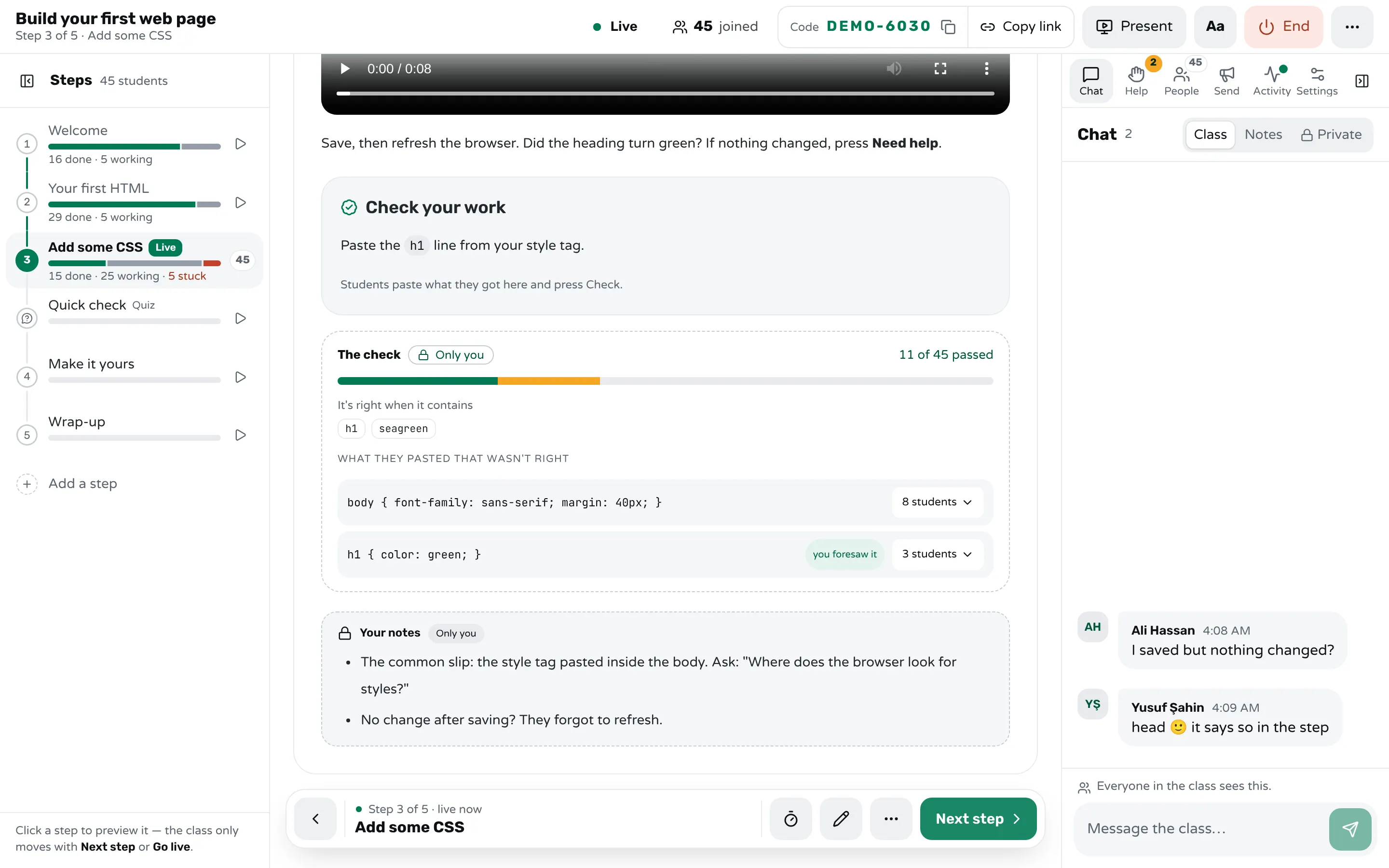
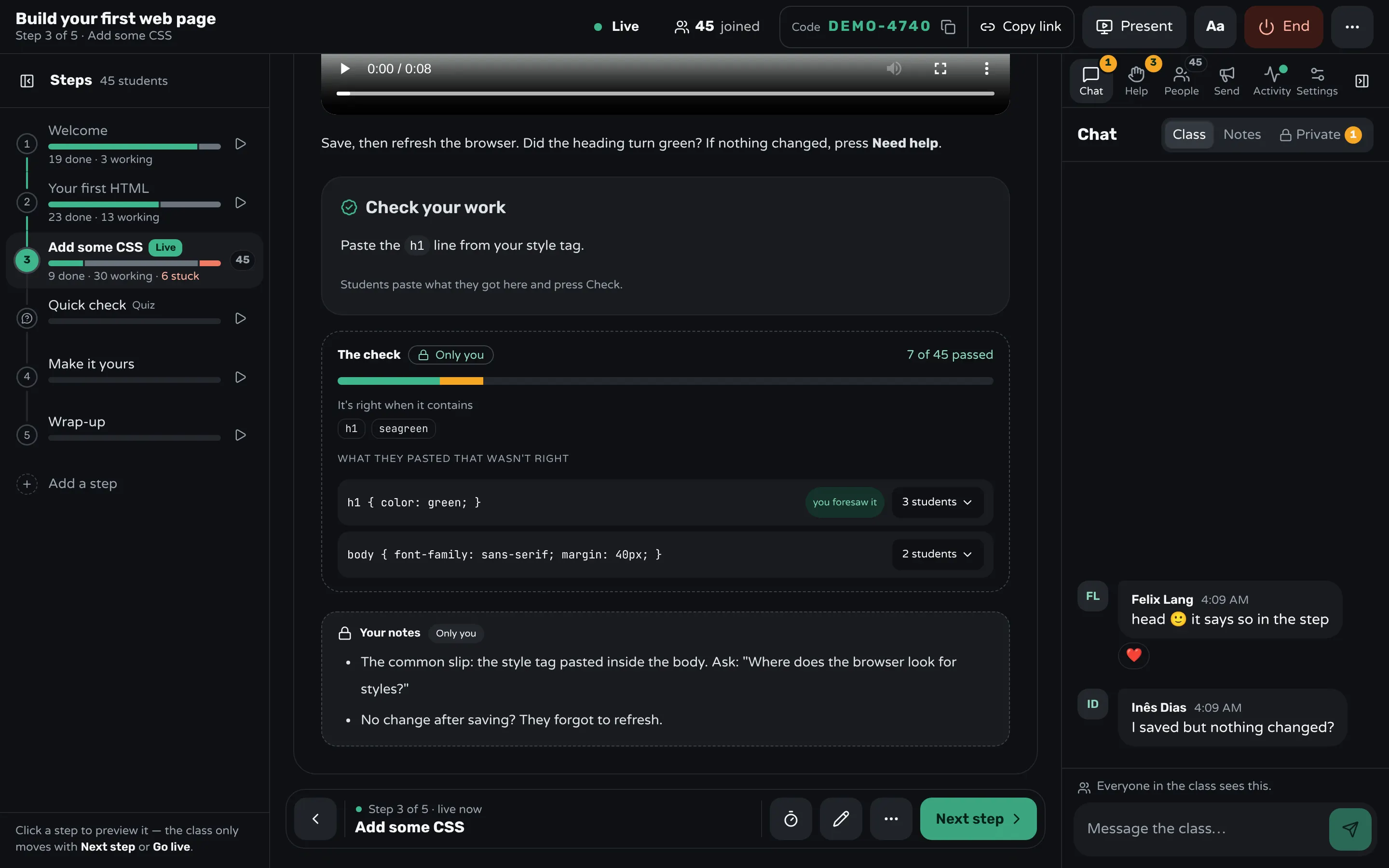
A teacher block in the step holds your own notes, such as the folder slip and the missing -m; students never get it. A student who is stuck presses Need help and can say what Git printed; the Help tab lists the requests oldest first. If a step has a mistake in it, edit it during the class and every student's screen updates. After the class, the report shows each step's checks: who passed, who didn't check, and the wrong pastes the class gave most, which tells you which Git step to rewrite before next time.
Sources
- The Carpentries, Version Control with Git: Instructor Notes
- The Carpentries, Version Control with Git: Tracking Changes
- Scott Chacon and Ben Straub, Pro Git, 2nd edition: What is Git? (2014)
- Perez-Riverol and others, Ten Simple Rules for Taking Advantage of Git and GitHub (PLOS Computational Biology, 2016)
Frequently asked questions
Should beginners learn Git on the command line or with a graphical app?
Either works for the first hour if every step shows a result students can check. The command line has one advantage in a workshop: everyone sees the same words, and git status tells them what to do next, so you can put the expected output in the step.
Should I teach Git and GitHub together?
Teach Git alone first, on one laptop, until add and commit feel routine. Add GitHub as its own later step, with a drawing of the two repositories, because beginners easily mix up the tool and the website.
How long does a beginner Git workshop take?
The basic loop of status, add, commit and log fits in about an hour of hands-on practice once everything is installed. Pushing to a remote, collaborating and resolving a conflict each need their own block of time.
Should I teach branches on the first day?
Not to complete beginners. Teach branches once tracking changes in one line of history feels routine; until then they add a new idea before the first one has settled.
What is the most common mistake beginners make with Git?
Running commands in the wrong folder, which Git answers with "fatal: not a git repository". Showing pwd and the project folder early, and asking for git status after every command, catches it at once.
Keep reading
How to run a hands-on coding workshop
Plan short steps that each end in working code, write the code live and slowly, and keep a queue for students whose code won't run.
4 min read · 19 Oct 2026
Run a live classHow to get everyone set up in the first five minutes
Send one setup page that ends in a check, make the first task that same check, and help the people who can't start before anyone else.
8 min read · 27 Oct 2026
See who's stuckHow to tell which students are stuck in a hands-on class
Stuck students rarely raise a hand. Give every step a done signal, look for who hasn't sent it, and help the right student first.
3 min read · 19 Oct 2026
Ready-made lessons from the library
Meet Workshopy — A Live, Interactive Product Tour
A live, interactive product tour of Workshopy for new users. It runs as a real Workshopy session, so the audience experiences the product as participants while…
16 steps · ~120 min · Free
OtherIntro to Git — Snapshots, Branches & Sharing
A short, hands-on first lesson in Git for complete beginners. Students build the mental model one idea at a time — snapshots, the three areas…
10 steps · ~65 min · Free
ScienceHow Epidemics Spread — R, Curves and Herd Immunity
An interactive first look at how infectious diseases spread through a population — and what stops them.
9 steps · ~60 min · Free
Learn any of them on your own, free, or copy one and teach it live. Browse the library
See it with a class of 45. No sign-up.
The live demo runs the real product with a simulated class. When you're ready, start free.