OtherEN
Intro to Git — Snapshots, Branches & Sharing
 WorkshopyOfficial
10 stepsQuiz9 interactiveDiagram
gitversion controlbeginners
Used by 1 teacherBeginner
Project management training for beginners: plan a website relaunch, slip tasks in a live Gantt chart, find the critical path and score risks.
WorkshopyOfficial
78 lessons · used by 2 teachers
Sign in to copy it to your workspace. It’s free.
10 steps · 2 quizzes · open any step, or read it here
This project management training for beginners starts with the question every new project lead meets: a task is late, so does the whole project move? You plan a small work project, a company website relaunch, and learn the basics of scope, schedule and risk by changing the plan and watching what happens.
Interactive · One task slips: does the launch date move? — try it in the lesson
You just watched one task, Build pages, take three days longer. The tasks after it slid right and the launch moved from day 19 to day 22. By the end you will know why that task moved the launch when another task could slip without moving anything, and what to do about it before it happens.
You need a browser and nothing else: no project software and no earlier training.
A project is temporary work with a start, an end and a goal: relaunch the website, move the office, run a customer webinar. Running the website day to day is operations; relaunching it is a project.
Every project trades three things: scope (what you will deliver), time (when) and cost (people and money). Together they are called the triple constraint, or the iron triangle, with quality in the middle. Change one corner and at least one of the others has to move, or quality pays for it.
Our project: the company website gets a new brand, the same pages, and has to be readable on phones. The block below uses illustrative numbers: every page is three person-days of work plus twenty days of set-up, and every extra person spends some of their time coordinating with the others.
Try it: keep the scope at 24 pages and pull the deadline from 6 weeks down to 4. Then push the scope up to 40 pages without moving the deadline. Watch the team size, the cost and the triangle's shape.
Interactive · Scope, time and cost: pull one corner — try it in the lesson
A shorter deadline needs more people, and more people spend more time talking to each other, so the cost rises faster than the speed. Some combinations can't be done at any price. That is why the first job of a project lead is to agree which corner is fixed: is the date the one thing that can't move, or the budget, or the scope?
Takeaway: scope, time and cost are tied together. Decide early which one is fixed, so everyone knows which ones can give.
Scope is the line around the work. A good scope statement names the goal, what the project delivers, and just as clearly what it does not. The "out of scope" list is the most useful part: it is what you point to when a new request arrives.
Scope creep is work that slips in without anyone changing the time or the budget: "while you're at it, could you also…". Each request is small and sensible; together they are how projects finish late. The answer is not to refuse every change. It is to handle each one as a change request: write it down, estimate what it costs in time and money, and let the person who owns the budget (the sponsor) decide.
Try it: read the project goal, then sort the eight requests. Each answer tells you why. When all eight are sorted, a request arrives in week 3.
Interactive · In scope or out? Sort the requests — try it in the lesson
When the goal is written clearly, most requests sort themselves. The ones that don't are the ones to settle with your sponsor before work starts, not in week 5.
Takeaway: write what is out of scope as well as what is in, and treat every new request as a change: estimate it, then decide.
A work breakdown structure (WBS) breaks the project into deliverables (the things you hand over: the design, the content, the built site) and each deliverable into work packages, pieces small enough to estimate and give to one owner. It is a tree of things, not a list of dates: the dates come later.
The WBS has one rule worth remembering, the 100% rule: the pieces under each box add up to all of the work in that box, no more and no less. Work that is not in the WBS has no estimate, no owner and no date, so it is the work that surprises you at the end.
Try it: press each deliverable to break it down, or press Break everything down. Then untick a work package, Redirects for example, and read the total.
Interactive · Break the relaunch into work packages — try it in the lesson
Twelve work packages, 35 person-days. Leave one out and the plan says 34, but the project still needs 35: the missing day turns up in the last week, as a surprise.
Takeaway: break the project into deliverables and work packages until each piece can be estimated and owned, and check that the pieces add up to all of the work.
A single number ("Build pages: 6 days") hides how sure you are. A three-point estimate asks for three: optimistic (O, if everything goes well), most likely (M) and pessimistic (P, if the usual things go wrong). The PERT formula weighs the most likely four times:
$$E = \frac{O + 4M + P}{6}$$
The spread, $(P - O) / 6$, says how uncertain the estimate is. For Build pages with O = 5, M = 6 and P = 13, the expected duration is $(5 + 24 + 13) / 6 = 7$ days: a day more than the most likely, because things can go a lot worse than planned but only a little better.
Then put the tasks in order. Most tasks wait for another one to finish before they start (a finish-to-start dependency): you can't build pages before they are designed.
Try it: move the pessimistic estimate up and down and watch the green expected line. Then make the three numbers equal.
Interactive · Three-point estimate for Build pages — try it in the lesson
When the pessimistic case is far away, the expected duration moves towards it. Asking for three numbers also starts the right conversation: "What would make it take 13 days?" is a risk you can write down.
Takeaway: estimate with optimistic, most likely and pessimistic durations; $(O + 4M + P) / 6$ gives the expected duration and the gap between O and P shows the uncertainty.
Four questions on the steps so far.
Question 1. The deadline moves two weeks earlier and the scope stays the same. What usually happens?
Question 2. In week 4 a manager asks the team to "also add a live chat" to the site. What is the best first move?
Question 3. What does the 100% rule of a work breakdown structure say?
Question 4. A task's estimates are O = 2, M = 4 and P = 12 days. What is the PERT expected duration?
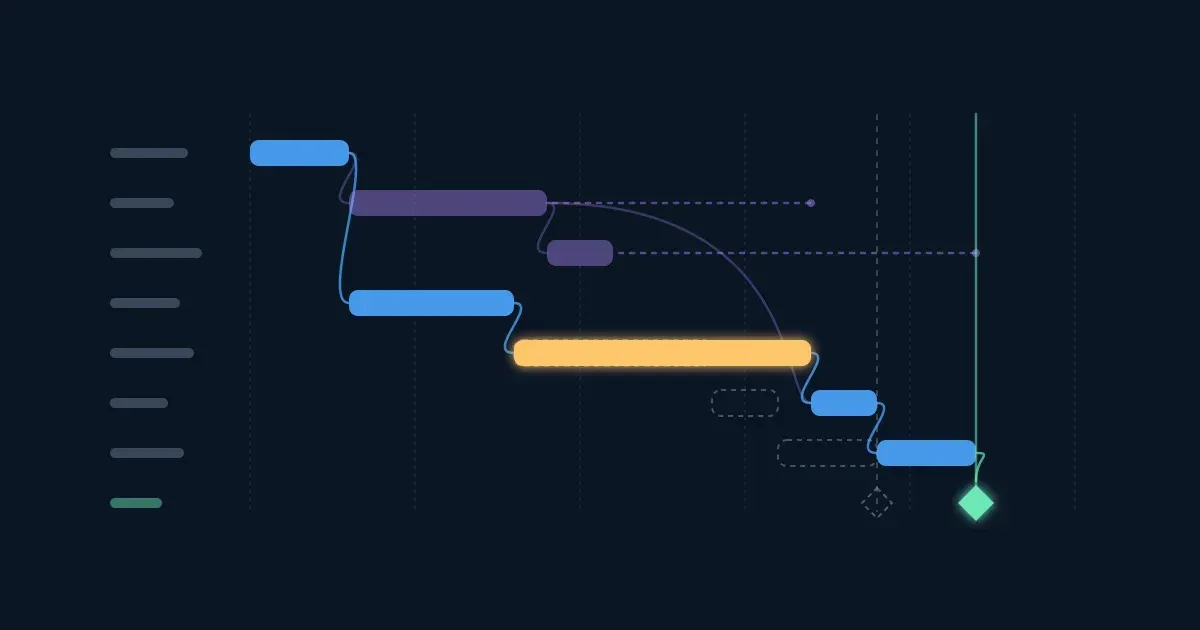
A Gantt chart draws each task as a bar on a timeline, with lines for the dependencies. Follow the lines from start to finish and you get paths through the project. The longest one is the critical path: its length is the shortest time in which the whole project can finish, and any delay to a task on it delays the finish by the same amount.
Tasks off the critical path have float (also called slack): how many days they can slip without moving the finish date. In the relaunch, Write content takes 6 days but the team loading the content can't start until the pages are built, so Write content has 5 days to spare.
Try it: Build pages is picked. Slip it by one day, then by three: the launch moves the same number of days. Now pick Write content and slip it by 4 days, then by 7. Last, pick Train the support team.
Interactive · Slip a task and watch the launch date — try it in the lesson
A slip on the critical path moves the launch day for day. A slip smaller than the task's float moves nothing; a slip bigger than the float uses it up, the task joins the critical path, and the launch moves by the difference. A milestone (the green diamond) is a moment with no duration, such as "site live": a date people outside the team will hold you to.
Takeaway: the critical path is the longest chain of dependent tasks; its tasks have no float, so watch them first. Other tasks can slip by up to their float without moving the finish.
To find the critical path by hand, list every path from start to finish and add up the durations: the longest is critical. A task's float is how much later it could finish without delaying the end:
$$\text{float} = \text{latest finish} - \text{earliest finish}$$
A new project: the team moves to a new office. Each box is a task with its duration in working days; an arrow means "waits for". Ordering furniture takes eight days because of the supplier's delivery time.
Try it: tap every task on the critical path and press Check. Then tap the task with the most float. Show the dates when you want to check your adding.
Interactive · Office move: find the critical path and the float — try it in the lesson
The furniture order (A, B, F: 11 days) is the critical path, though Move day feels like the main event. Hiring movers has 4 days of float: it could be booked four days later and the office would still be ready on day 11. That is where float is useful: it tells you which tasks can wait when people are busy, and which ones can't.
Takeaway: add up each path; the longest is critical. Float tells you which tasks can wait without moving the finish.
A plan with dates and no names is a wish. A RACI chart lists the tasks in rows and the people or roles in columns, and puts one letter in each cell:
The two rules that matter: every task has one A (two owners means nobody owns it) and at least one R (someone actually does the work). On a small team one person is often both R and A.
Try it: three rows of this RACI chart break the rules. Press the cells to change their letters until every row has a green dot.
Interactive · Fix the RACI chart — try it in the lesson
Most project friction is not a missing task, it is a task everyone thought someone else was doing. A RACI chart makes that visible before the work starts. Keep it short: the tasks where ownership is unclear, not every work package.
Takeaway: every task needs exactly one Accountable and at least one Responsible; Consulted and Informed say who hears about it before and after.
A risk is something that might happen and would affect the project: content arriving late, a key person leaving. An issue is a risk that already happened. A risk register lists the risks, scores each one, names an owner and a response, and is reviewed at every project check-in.
A common way to score a risk is to rate its likelihood and its impact from 1 to 5 and multiply them:
$$\text{risk score} = \text{likelihood} \times \text{impact}$$
So 4 × 3 = 12. The score sorts the register: the highest risks get attention first. In this block, 12 and above is high, 5 to 11 medium and 4 or below low; each organisation sets its own bands.
There are four usual responses: avoid (change the plan so it can't happen), reduce (make it less likely or less harmful), transfer (move the consequence to someone else, such as a supplier or an insurer) and accept (watch it and keep a fallback ready).
Try it: pick risk 1, content from teams arriving late. Its response is to set early content deadlines. Lower its likelihood to 2 as if that worked and watch it move in the register. Then raise risk 3's likelihood: the key developer has just handed in their notice.
Interactive · Risk register: score, rank and respond — try it in the lesson
A hosting outage on launch day scores only 5, because it is unlikely, but its impact is the highest on the grid. Many teams keep an eye on high-impact risks whatever their score, and give them a fallback plan.
Takeaway: score each risk as likelihood × impact, give it an owner and a response, and review the register as often as the schedule.
Five small calculations from the steps on schedules, estimates and risk. Use working days. A hint costs nothing.
Six questions on the whole lesson.
Question 1. What is the critical path?
Question 2. "Write content" has 5 days of float and slips by 4 days. What happens to the launch date?
Question 3. Which of these are signs of scope creep? (pick all that apply)
Question 4. In a RACI chart, a task has two people marked A. What is wrong?
Question 5. A risk has likelihood 3 and impact 5. A second risk has likelihood 4 and impact 3. Which ranks higher in the register?
Question 6. A supplier contract makes the hosting company pay if the site is down on launch day. Which risk response is that?
Workshopy shares this lesson under CC BY 4.0. Anyone may use and change it, with credit to you. Anyone can learn it here, free. A copy in your workspace is yours to change and run live; your students never need an account.
Version 1Current
· First published
Copies are made from the current version. A copy you already have doesn’t change.
WorkshopyOfficial10 stepsQuiz9 interactiveDiagram
gitversion controlbeginners
WorkshopyOfficial16 steps2 quizzes15 interactiveDiagram
workshopyproduct touronboarding
WorkshopyOfficial10 steps2 quizzes10 interactive
data-literacystatisticsmean and median
WorkshopyOfficial10 steps2 quizzes9 interactive
managementokrgoal setting
WorkshopyOfficial10 steps2 quizzes9 interactive
managementtime managementeisenhower matrix
WorkshopyOfficial9 steps2 quizzes9 interactive
managementcustomer servicede-escalation
Comments
No comments yet. Be the first to say how it went.