
How to teach debugging to beginners
By the Workshopy teamPublished 8 min read
Beginners don't need more hints from you; they need a routine they can run without you. Teach it on purpose, from the first lesson: read the error message, predict what the code will do before running it, find the line where what happens stops matching what you expected, and change one thing at a time. Model it out loud with your own mistakes, give them bugs to find on purpose, and ask for three things before they put a hand up.
Why beginners raise a hand at the first red line
Watch a room of beginners hit their first error. Some read it. Most raise a hand straight away, and the rest change something at random until the red goes away or they give up. None of that is laziness. An error message is written for someone who already knows the language, and a beginner has no plan for what to do next.
Laurie Gale and Sue Sentance interviewed secondary school computing teachers in 2025 and named the result the hands-up problem: students ask the teacher as soon as they meet an error, and when many hands go up at once, the teacher can't reach them all. One teacher put it simply: "there has to be a more scalable model than going around and solving individual people's code problems." The teachers who coped best had the same counters: they modelled debugging live, taught students to decode error messages, asked students to try before they helped, and made mistakes normal in the room.
Greg Wilson's Teaching Tech Together draws the same conclusion from the research: teach novices how to debug, explicitly. Good debuggers, the studies he cites found, re-read the task, traced what the code does, and tested as they went. Those are habits, and habits can be taught.
Read the error message, out loud, once
Start with the error itself. Beginners often treat it as a red light that means "wrong", not as a sentence that says what is wrong and where. Researchers who tracked where programmers look found they spend a real share of their time on error messages, and that how hard a message is to read predicts how well they do. So teach the reading.
Take one real error and read it with the class, part by part:
Traceback (most recent call last):
  File "hello.py", line 3, in <module>
    print("Hello, " + nme)
NameError: name 'nme' is not defined- The last line first. It names the kind of error and says what went wrong: Python doesn't know
nme. - Then the line number. Line 3 is where Python noticed, not always where the mistake is. Here it is: a typo.
- Then your guess, in one sentence: "I meant
name."
Do this three or four times in the first lesson, with different errors. After that, when a student shows you an error, ask them to read you the last line before you say anything.
Predict before you run
The most useful single habit is to say what you expect before you press Run. A student who predicted "it prints Hello, Maya" and sees an error knows two things at once: something is wrong, and roughly where their idea of the program parted from the real one. A student who didn't predict only knows the screen is red.
Make prediction part of the task, not a nice extra. Write "Before you run it: what will it print?" into the step. Ask the room for predictions out loud before anyone runs a demo. Wilson recommends exactly this: having learners predict a program's output just before it runs is quick enough to use in class.
When the prediction and the result disagree, the next question is "which line is the first one that did something you didn't expect?" For short programs, have students trace by hand: write the value of each variable next to its name as it changes. One study of novices found that writing values down as they changed was the tracing strategy that went with the most correct answers.
Expect students to rush this part. Gale and Sentance also built a tool, PRIMMDebug, that walks students through predict, run, spot the defect, inspect the code, find the error, fix it and test. Students used it, but spent a median of 19 seconds inspecting the code before moving on. A routine on paper is not enough; give each stage a small task they have to finish, like pointing at the line before they may change it.
Change one thing at a time
Beginners debug by scattering changes: three edits, run, still broken, three more. Now the program has four bugs and they can't tell which edit did what. Give them a rule they can repeat: change one thing, run, look. If the change didn't help, undo it before trying the next idea.
Two tools make the rule easy to follow:
- A print where the doubt is. "Is this loop running at all?" Put one
printinside it and run. Show what makes a bad print, too: the same message in both halves of aniftells you nothing. - Make the program smaller. Comment out the half you think works, or copy the failing three lines into a new file. A bug in five lines is easier to find than one in fifty.
Model it with your own mistakes
Live coding is the strongest way to teach all of this, because you will make mistakes in front of the class. Don't hide them. When your code fails, stop and think aloud: read the error, say your prediction, change one thing. Students see the routine used by someone who knows it, and they see that a teacher's code breaks too.
If you are a careful typist, break things on purpose. Plant a typo, then "discover" it. Gale and Sentance's teachers used the same idea in sabotage activities: students get working code with one bug planted in it, and their job is to find it. A bug they know exists is a safe way to practise.
Give students bugs to find
Debugging gets better with practice, so give it its own exercises. A find-the-bug task has three parts:
- Code that should do something clear, with the goal written above it: "This should make the heading green."
- One bug, of a kind beginners really make: a misspelled name, a missing colon,
=instead of==, a loop that stops one early. - A check they can run: what it should print, or what the page should look like when it is fixed.
Start with bugs that produce an error message, so students practise reading them. Then add the harder kind: bugs that produce no error at all, only the wrong result. In CSS, a misspelled property such as colour is skipped without a word (teaching HTML and CSS to beginners lists the other silent mistakes of a first web lesson). That is the moment students learn that "no error" doesn't mean "right", and that the check matters as much as the code.
Three things before you ask
Now give the routine a place in the room. Before a student asks for help, they write down three things:
- What I expected to happen.
- What happened instead, with the last line of the error if there is one.
- What I already tried.
Most students who write those three lines find the bug while writing them. The ones who don't arrive with a question you can answer in a minute, instead of "it doesn't work". Say clearly that asking is still fine; the three lines make the help faster, not the asking harder. Getting students to ask for help covers the other half: making sure the quiet students ask at all.
A debugging step in Workshopy
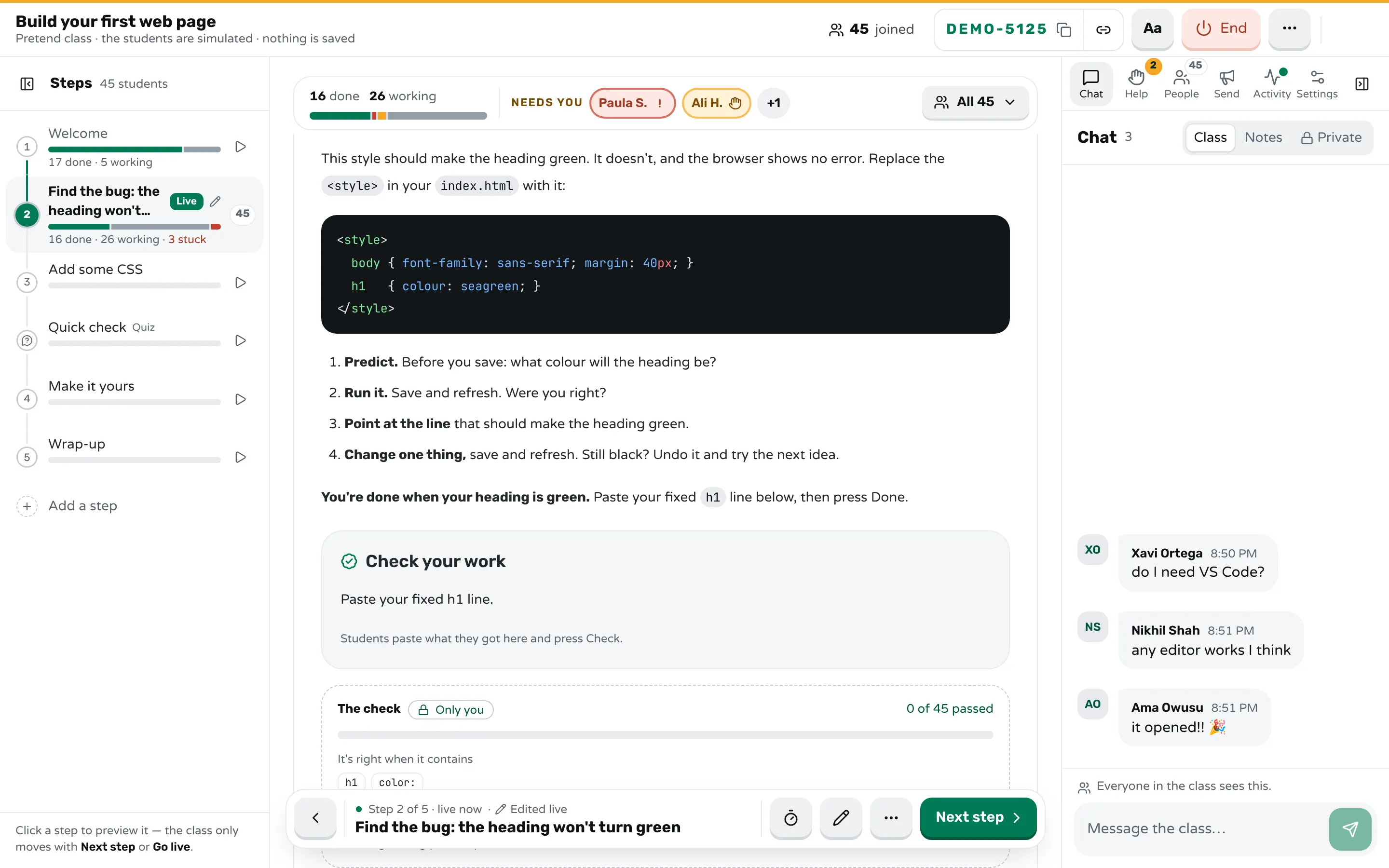
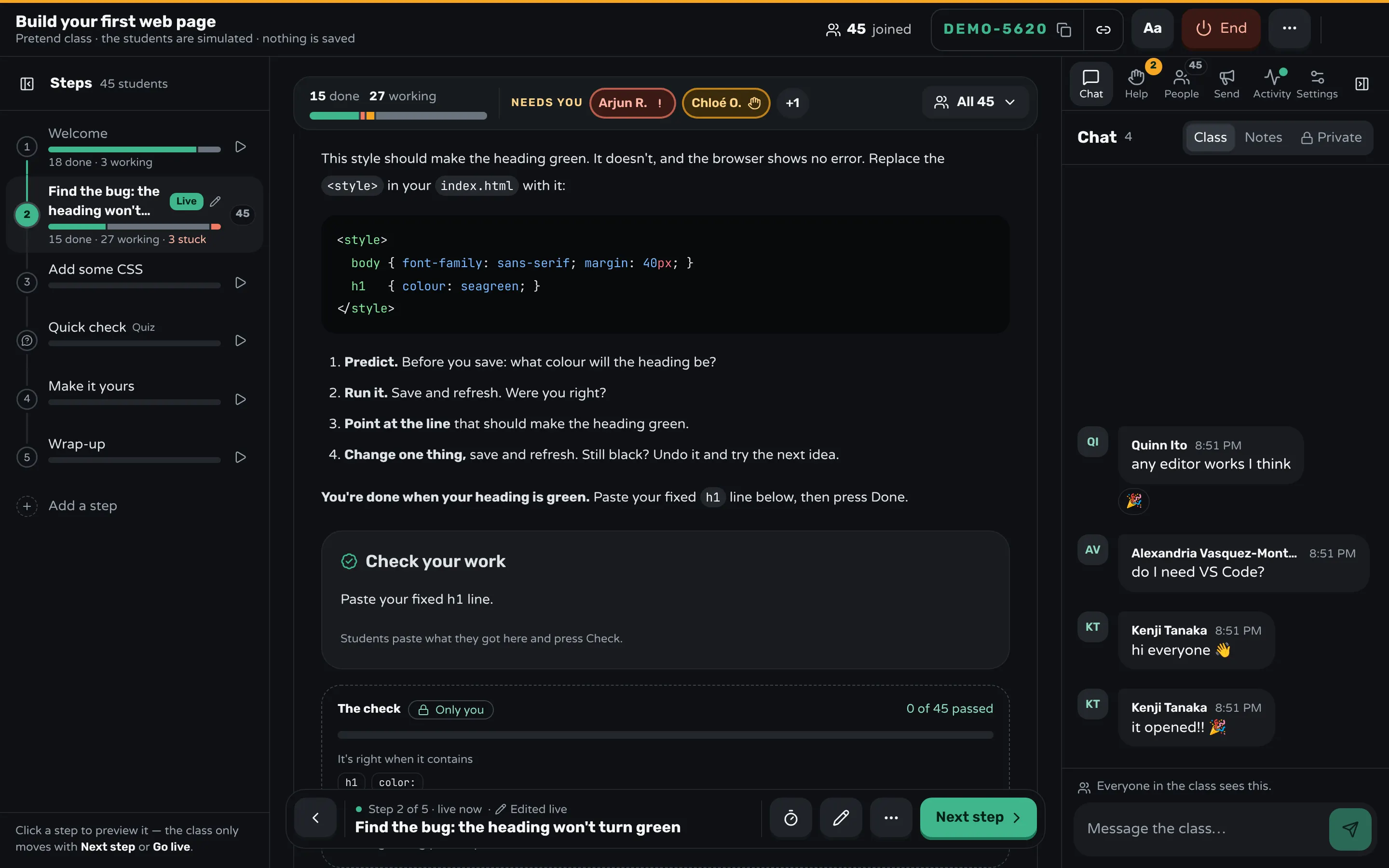
In Workshopy a lesson is a Markdown document, and each step is one heading. You can write the routine into the step itself, so every student sees it at the moment they need it, and you see who is stuck.
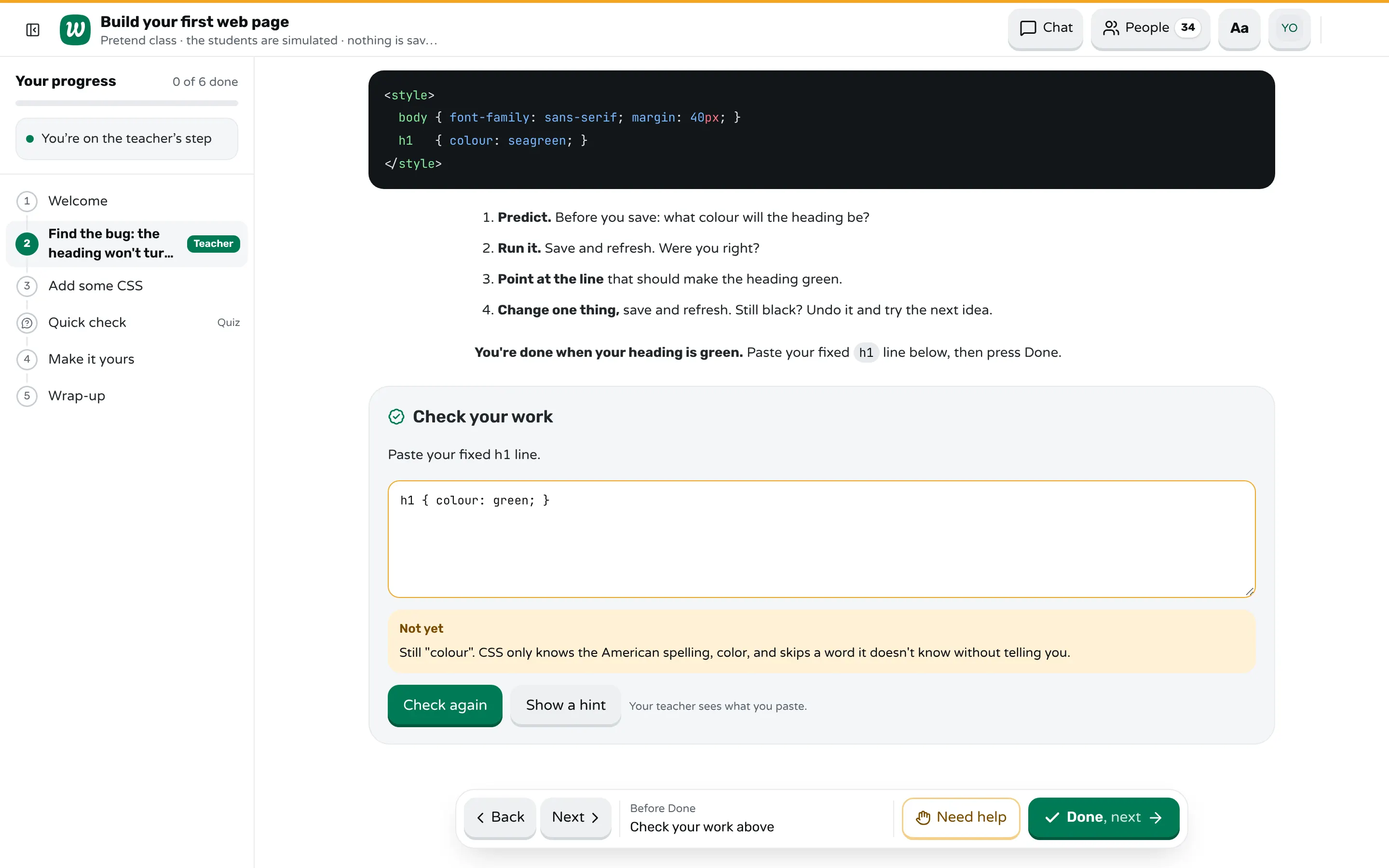
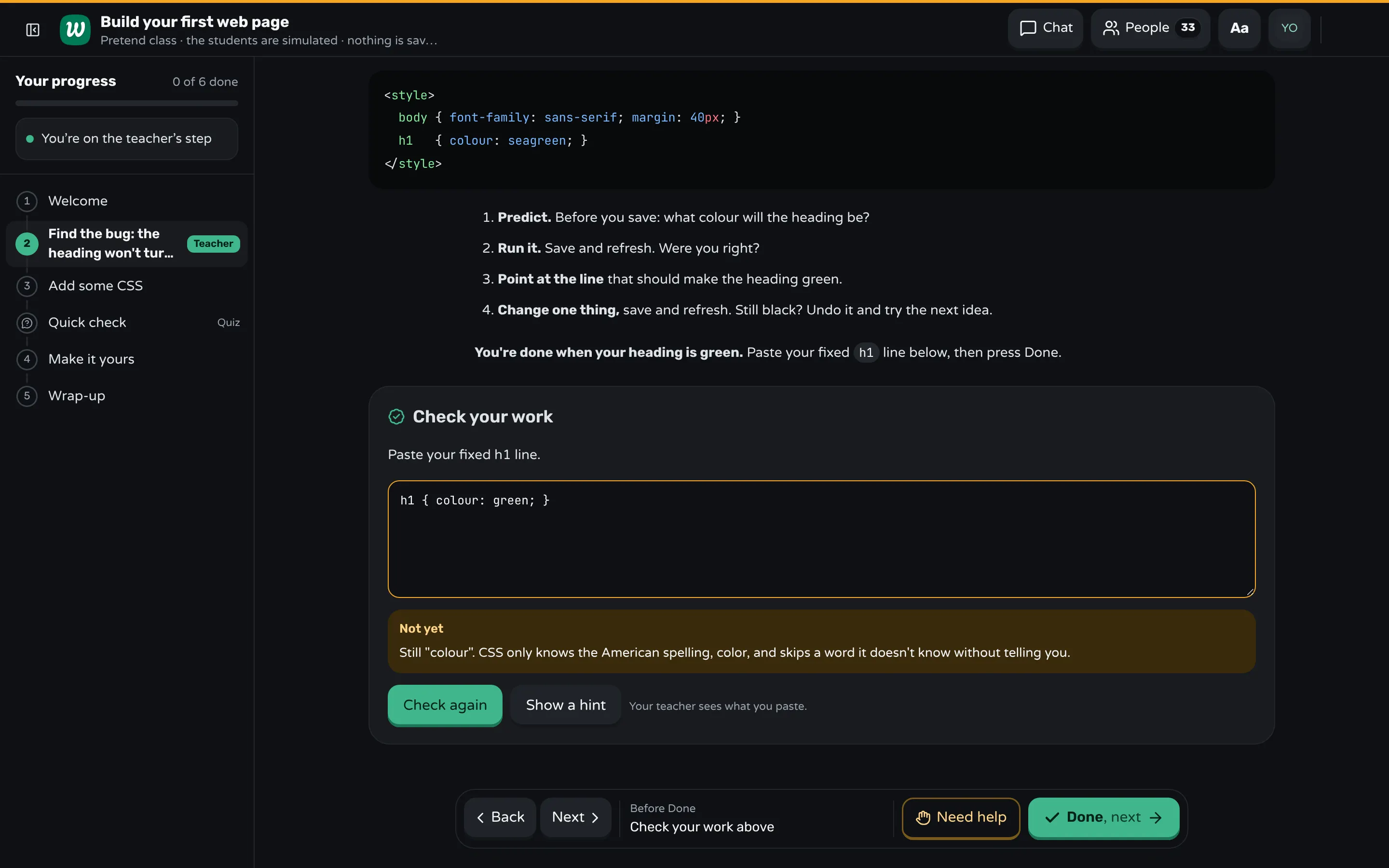
The step. Put the broken code, the goal, and the routine as numbered lines in the step: predict, run, point at the line, change one thing. A ```teacher block holds your own notes, such as the question to ask the room; students never see it.
The check. End the step with a ```check block. Students paste their fixed line, and the server checks it against your key. You write a mistake: line for each wrong answer you expect, and that student gets your words right away:
```check
Paste your fixed h1 line.

contains: h1
contains: color:

mistake: colour → Still "colour". CSS only knows the American spelling, color, and skips a word it doesn't know without telling you.
hint: Read the h1 line letter by letter.
```
On your screen the same check shows how many students passed, and groups what they pasted that wasn't right, so you can see the mistake the whole room is making.
Asking for help. In a lesson with code, a student's Need help button offers "I get an error" as a reason and a box for a note, so the three things fit in the request. You see each request in the Help panel with its note, oldest first, and the student shows by name in amber in the class bar above the lesson.
Sources
- Laurie Gale and Sue Sentance, The Hands-Up Problem and How to Deal With It: Secondary School Teachers' Experiences of Debugging in the Classroom (2025)
- Laurie Gale and Sue Sentance, PRIMMDebug: A Debugging Teaching Aid For Secondary Students (2025)
- Greg Wilson, Teaching Tech Together, "How Do Novices Debug?" and "Do Better Error Messages Help?" (2019)
Frequently asked questions
When should I start teaching debugging?
In the first lesson, with the first error anyone sees. Students meet errors from the first minute, so waiting until a later unit leaves them stuck with no plan.
What is the best first debugging strategy for beginners?
Reading the error message: the last line first, then the line number. It costs nothing, works in every language, and turns "it's broken" into a question you can answer.
Should I fix a student's bug for them?
Rarely. Ask them to read the error to you and say what they expected; often they find it while talking. When you do fix it, say each step aloud so they hear the routine.
How do I teach debugging when there is no error message?
Use bugs that give the wrong result instead of an error, and have students predict the result before they run. A check they can compare against, such as the output it should print, shows them something is wrong.
Do beginners need a debugger tool?
Not on day one. Printing a value where the doubt is and tracing variables by hand teach the same thinking with nothing to install; a step-through debugger is worth adding once they write longer programs.
Keep reading
How to get students to ask for help
Make asking one private action that costs nothing, show it is normal, answer so they ask again, and check in on the ones who still don't.
7 min read · 28 Oct 2026
See who's stuckHow to run a help queue in a classroom
Keep one list of who needs help, take it in order, keep each visit short, and explain a repeated problem to the whole room at once.
6 min read · 20 Oct 2026
Hands-on & coding workshopsHow to run a Python workshop for beginners
Make setup part of the day, give every step a program that prints something, and plan for the errors beginners hit in the first hour.
8 min read · 3 Nov 2026
Ready-made lessons from the library
Intro to Git — Snapshots, Branches & Sharing
A short, hands-on first lesson in Git for complete beginners. Students build the mental model one idea at a time — snapshots, the three areas…
10 steps · Free
Teacher trainingMeet Workshopy — A Live, Interactive Product Tour
A live, interactive product tour of Workshopy for new users. It runs as a real Workshopy session, so the audience experiences the product as participants while…
16 steps · Free
Teacher trainingTrain the Trainer: How to Design a Hands-On Workshop
A train the trainer workshop on designing hands-on sessions: write objectives you can see, plan an hour of talks, exercises and checks, find who's stuck.
11 steps · Free
Learn any of them on your own, free, or copy one and teach it live. Browse the library
See it with a class of 24. No sign-up.
The live demo runs the real product with a simulated class. When you're ready, start free.